You have 0 items in your cart

CRM survey integration is the process of connecting digital survey platforms directly to your customer relationship management system so that responses automatically update contact records, trigger workflows, and remove the need for manual data exports. Think of it as giving your CRM a direct telephone line to your customers, rather than relying on someone to scribble notes and post them across the office. Platforms like HubSpot, Salesforce, and Act! CRM all support this kind of connection, whether through native integrations, automation tools like Zapier, or developer-built APIs. The result is real-time, actionable feedback sitting exactly where your team needs it, without lifting a finger.
What are the main methods for CRM survey integration?
The three main approaches to connecting online survey tools with a CRM are native integrations, automation platforms, and API or webhook connections. Each suits a different level of technical resource and business complexity.
Native integrations are the quickest route. HubSpot’s free Form Builder, for example, transfers survey data directly into HubSpot CRM and can trigger alerts on completion or new lead creation. Salesforce goes further, storing survey responses as standard objects that relate directly to Accounts and Contacts. Native integrations typically take 5 to 15 minutes to configure, making them the obvious starting point for most businesses.

Automation platforms like Zapier and Make sit in the middle ground. They connect survey tools that lack a direct CRM integration, building multi-step workflows without writing a single line of code. Setup usually takes 15 to 30 minutes. This is the sweet spot for SMEs who want flexibility without hiring a developer.
API and webhook integrations are the most powerful option, enabling real-time, custom data flows between any survey platform and any CRM. The trade-off is time. API builds can take hours to days depending on complexity, and you will need developer resources.
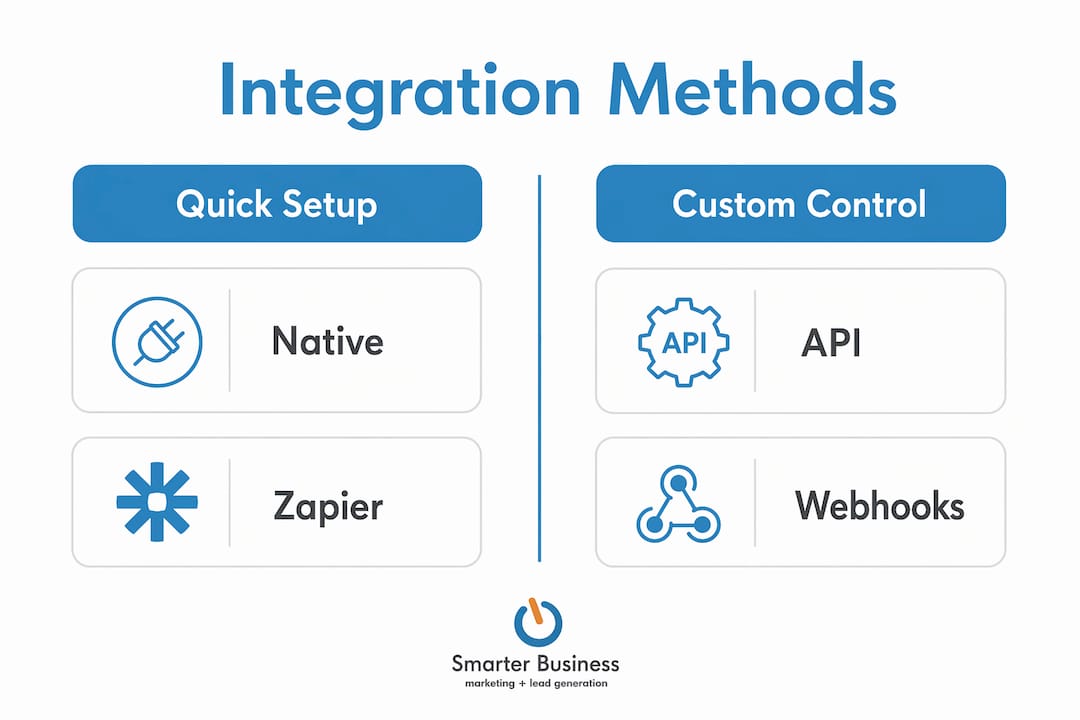
| Method | Setup time | Cost | Flexibility | Best for |
|---|---|---|---|---|
| Native integration | 5–15 minutes | Usually included | Low to medium | Quick wins, popular CRMs |
| Zapier / Make | 15–30 minutes | Subscription fee | Medium to high | No-code multi-step workflows |
| API / Webhook | Hours to days | Developer time | Very high | Custom or real-time needs |
Pro Tip: Start with the native integration if your CRM supports it. You can always layer Zapier on top later for more complex workflows without rebuilding from scratch.
What best practices keep your CRM data clean after syncing?
Getting survey responses into your CRM is the easy part. Keeping that data clean and useful is where most businesses come unstuck, like trying to tidy a teenager’s bedroom while they are still in it.
The single most important discipline is deliberate field mapping. Avoid syncing raw open-text responses without a clear strategy for where they land in your CRM. Decide in advance which survey question updates which CRM field, and whether the sync should append or overwrite existing data. Dumping unfiltered free-text into a contact record creates clutter that makes segmentation a nightmare.
Here are the practices that separate tidy, useful CRM data from a digital landfill:
- Map every survey question to a specific CRM field before going live
- Sync only the responses that are relevant to sales or support workflows, not every answer
- Use scored responses, such as NPS or CSAT, to trigger automated follow-ups rather than syncing the raw number alone
- Test the full integration end-to-end with dummy responses before sending it live to customers
- Review synced data monthly to catch field mapping drift or unexpected overwrites
Workflow triggers are where the real value lives. A low NPS score, for instance, can automatically create a support task, send a sales alert, or move a contact into a re-engagement sequence. Automating these triggers immediately after response receipt turns survey data from a static report into a living, breathing part of your sales and support process.
Pro Tip: Some AI-powered survey platforms can send narrative insights rather than just raw scores to your CRM contact records. This means your sales team sees a plain-English summary of customer sentiment, not just a number between one and ten.
How do HubSpot, Salesforce, and Act! CRM handle survey integrations?
The three platforms most commonly discussed when businesses explore CRM tools for surveys each take a slightly different approach, and understanding those differences saves a lot of head-scratching later.
-
HubSpot offers a free Form Builder that feeds responses directly into contact records, with built-in support for notifications and follow-up sequences. Basic setup takes under half an hour. Full integration including custom properties and live chat can take two to four hours, but the no-code interface means a non-technical team member can manage it.
-
Salesforce treats survey responses as standard CRM objects, linking them directly to Accounts and Contacts. Its Flows and Record Lifecycle Maps enable closed-loop feedback automation, where a detractor NPS score automatically escalates to a support manager, a low CSAT creates a task, and a neutral score queues a follow-up survey. This is enterprise-grade feedback automation that genuinely earns its keep.
-
Act! CRM supports survey addons and marketing automation that connect survey responses to sales and support workflows. For Irish SMEs in particular, Act! CRM’s flexibility means you can configure survey-triggered sequences that match your actual business process, rather than bending your process to fit the software. Smarterbusiness specialises in exactly this kind of tailored configuration.
The common thread across all three is that closed-loop feedback automation connects survey triggers, response mapping, and workflow actions inside the CRM itself. The feedback loop closes automatically, without anyone manually checking a spreadsheet.
Which survey tools work best for CRM integration?
Survey platforms vary considerably in how well they connect to CRM systems, and the gap between the best and the rest is wider than most people expect.
SurveyMonkey, Typeform, Qualtrics, and Google Forms are the names most businesses recognise. Their native CRM integration support varies widely, with some requiring Zapier or Make as an intermediary and others offering direct connections only on higher pricing tiers. Qualtrics is the most powerful for enterprise use but carries a price tag to match. Google Forms is free and connects to many CRMs via Zapier, though it lacks advanced logic and branding options.
Platforms like onlinesurvey.ai are worth noting for their AI-generated narrative insights, which push interpreted feedback rather than raw scores into your CRM. This is a meaningful advantage for sales teams who do not have time to decode a number on a scale.
When choosing a survey tool for CRM integration, weigh up these factors:
- Question types and logic: Does the platform support conditional branching and skip logic?
- Custom branding: Can you match the survey to your company’s visual identity?
- Analytics dashboard: Does it provide usable reporting inside the survey platform itself?
- Response limits: Free tiers often cap monthly responses, which catches growing businesses off guard
- CRM compatibility: Does it connect natively to your CRM, or will you need Zapier in the middle?
For most Irish SMEs, a mid-tier tool like Typeform or SurveyMonkey combined with a well-configured Act! CRM integration via Zapier hits the right balance of cost, flexibility, and ease of use. You can also explore customer retention automation strategies that build on survey-triggered CRM workflows for longer-term engagement.
Key takeaways
CRM survey integration delivers the most value when survey responses trigger automated workflows rather than simply filling a data field.
| Point | Details |
|---|---|
| Start with native integrations | HubSpot and Salesforce offer quick native setups that take under 30 minutes for most businesses. |
| Field mapping is non-negotiable | Map every survey question to a specific CRM field before going live to prevent data clutter. |
| Use scores to trigger workflows | NPS and CSAT scores should automatically create tasks, alerts, or follow-up sequences in your CRM. |
| Choose tools that match your CRM | Not all survey platforms connect natively; verify compatibility before committing to a subscription. |
| Test before you launch | Run end-to-end tests with dummy responses to catch field mapping errors before real customers are affected. |
What I have learned from watching businesses get this wrong
I have seen businesses spend weeks debating which survey tool to buy, then spend ten minutes on the integration setup and wonder why their CRM looks like a skip fire six months later. The tool choice matters far less than the integration discipline.
The most common mistake I see is treating CRM survey integration as a data transfer exercise. It is not. It is a workflow design exercise. The question is never “how do I get this response into the CRM?” It is “what should happen in my business the moment this response arrives?” That shift in thinking changes everything.
My honest advice is to start with one survey type, one workflow trigger, and one CRM field update. Get that working cleanly, test it thoroughly, and then build from there. Businesses that try to automate everything at once end up with a CRM full of noise and a team that trusts none of it. The CRM consultancy work we do at Smarterbusiness almost always starts with simplification, not addition.
Native features also tend to be underused. Before reaching for a developer or a complex Zapier chain, check what your CRM already does out of the box. Act! CRM, for instance, has survey and automation capabilities that most users never explore simply because nobody showed them where to look.
— Patrick Lennon
How Smarterbusiness can help you get this right
If you are running Act! CRM and want to connect it properly to your survey tools, Smarterbusiness has been doing exactly this for Irish SMEs since 2014. We do not just point you at a settings menu and wish you luck.

Our Act! CRM training covers survey integration, field mapping, and workflow automation in practical, hands-on sessions tailored to how your business actually operates. If you need a more bespoke setup, our CRM customisation service configures Act! CRM to match your terminology, your processes, and your reporting needs. Survey data that arrives in your CRM should do something useful. We make sure it does. Get in touch with the Smarterbusiness team to find out what a properly integrated survey workflow looks like for your business.
FAQ
What is CRM survey integration?
CRM survey integration automatically syncs online survey responses into CRM contact, lead, or account records and triggers workflows such as follow-up tasks or alerts. It removes the need for manual data exports and turns customer feedback into immediate business action.
Which CRM has the best built-in survey tools?
Salesforce offers the most advanced native survey capabilities, storing responses as standard objects and supporting closed-loop automation via Flows. HubSpot’s free Form Builder is the easiest starting point for smaller businesses.
How long does it take to set up a survey CRM integration?
Native integrations typically take 5 to 15 minutes, automation platforms like Zapier take 15 to 30 minutes, and API-based integrations can take hours to days depending on complexity and developer availability.
Do I need a developer to integrate survey tools with my CRM?
Not for most setups. Native integrations and no-code platforms like Zapier handle the majority of CRM survey integration use cases without any developer involvement.
What is the biggest mistake businesses make with survey CRM integration?
The most common error is syncing raw open-text responses without field mapping, which creates cluttered, unsegmentable CRM data. Deciding which survey answers update which CRM fields before going live prevents this entirely.