You have 0 items in your cart

A CRM reporting dashboard is a centralised, customisable visual interface that translates raw customer relationship management data into real-time metrics, charts, and Key Performance Indicators your team can act on immediately. Think of it as the cockpit of your business: everything you need to know is visible at a glance, without digging through folders or squinting at a spreadsheet the size of a football pitch. Without effective dashboards, your CRM risks becoming little more than an expensive filing cabinet. Data collection without reporting fails to convert information into decisions, which is precisely the problem a well-configured dashboard solves.
What is a CRM reporting dashboard, and how does it differ from a CRM report?
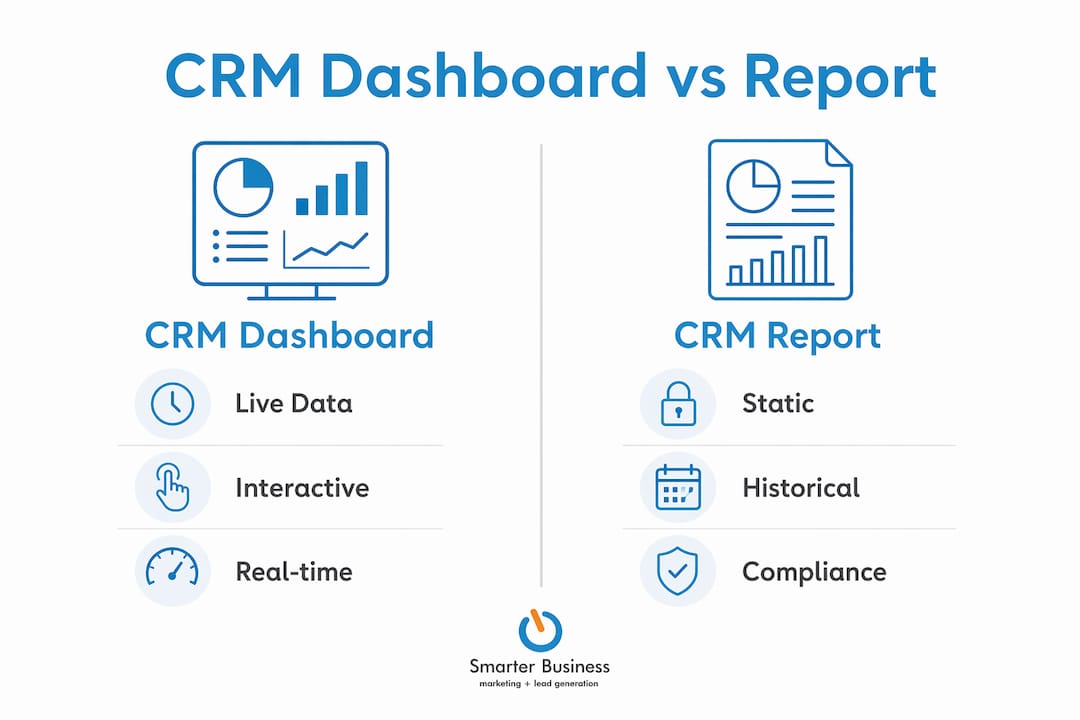
These two terms get muddled constantly, and the confusion costs businesses real time and clarity. CRM reports are static, document-style outputs used for deep-dive historical analysis, compliance, and auditing. A CRM reporting dashboard, by contrast, is an interactive, real-time visual interface designed for monitoring daily KPIs without manual exports or waiting for someone to run a query.
The distinction matters more than most teams realise. If you pull a monthly sales report to review last quarter’s performance, that is a report doing its job. If you want to know right now how many deals are sitting in the pipeline and which ones have gone cold, that is a dashboard’s territory.

| Feature | CRM report | CRM dashboard |
|---|---|---|
| Data freshness | Historical snapshot | Live, real-time updates |
| Format | Static document or export | Interactive visual interface |
| Primary purpose | Compliance, auditing, trend analysis | Daily monitoring of KPIs |
| Best used by | Management, finance, compliance teams | Sales, marketing, and service teams |
| Risk of misuse | Over-reliance for live decisions | Clutter from too many metrics |
Using reports for compliance and dashboards for live monitoring prevents information overload and keeps your team focused on what actually matters today.
Pro Tip: Never paste a static report into a meeting and call it a dashboard review. One is a post-mortem; the other is a live pulse check. Use each for what it was built for.
Key features and benefits of CRM reporting dashboards
A CRM dashboard functions as a visual hub that consolidates data from sales, marketing, and customer service into one place, accessible by the right people without technical gymnastics. No manual exports. No waiting for the IT department. Just the numbers your team needs, presented in charts, graphs, and gauges that actually make sense.
The core features worth knowing about include:
- Real-time data visualisation. Pipeline values, conversion rates, and customer activity update continuously rather than on a weekly batch cycle.
- Customisable views. Sales managers see deal stages and revenue forecasts; customer service leads see ticket volumes and resolution times. Each role gets what it needs, not a wall of irrelevant numbers.
- Integration across teams. Marketing campaign performance, sales pipeline health, and service response times all feed into one coherent picture.
- AI-assisted trend detection. Advanced dashboards use AI and machine learning to flag stalled deals or potential revenue risks before they become expensive problems.
The benefits follow naturally from these features. Effective CRM dashboards improve decision-making by replacing gut feelings with evidence, such as identifying which lead sources actually generate revenue rather than just volume. Revenue forecasting becomes more accurate because the data is live, not three weeks old. Team accountability improves because performance is visible, not buried in a report nobody reads until month-end.
If your business relies on email marketing and automation, a well-configured dashboard can show you in real time which campaigns are driving pipeline activity and which are burning budget for nothing.
How to use CRM dashboards effectively in your team
Getting a dashboard built is the easy part. Getting your team to actually use it is where most businesses stumble. A dashboard that is not reviewed regularly serves little purpose, no matter how beautifully it is designed.
Follow these steps to make dashboards a genuine part of how your team works:
- Display only critical metrics. If a number does not drive a decision, remove it. Clutter is the enemy of clarity.
- Create role-specific views. A sales rep does not need to see customer service ticket data. Give each team member a view built around their actual responsibilities.
- Schedule a standing review. A short weekly meeting where the team walks through dashboard data turns passive monitoring into active decision-making.
- Set threshold alerts. Configure your CRM to notify team members when a KPI drops below an acceptable level, rather than waiting for someone to notice.
- Review and refine quarterly. Business priorities shift. Your dashboard should shift with them, not stay frozen in the configuration you set up two years ago.
Pro Tip: If you notice team members are not logging into the dashboard, that is a signal. Either the metrics are not relevant to their daily work, or the dashboard needs a redesign. Ask them directly what numbers they actually care about.
Smarterbusiness works with SMEs across Ireland to customise CRM dashboards so they reflect how a business actually operates, not how a software vendor imagined it might.
Common challenges when using CRM reporting dashboards
Even well-built dashboards run into trouble. Knowing the pitfalls in advance saves a lot of frustration.
- Dashboard neglect. Teams stop checking dashboards when the metrics shown do not connect to their daily work. The fix is simpler than most think: involve the team in choosing which KPIs appear.
- Over-customisation. Adding every available metric feels thorough. It is actually paralyzing. A dashboard with thirty widgets is as useful as a map with no roads highlighted.
- Poor data quality. A dashboard is only as reliable as the data feeding it. If your team is not logging activities, calls, and deals consistently, the dashboard will show a flattering fiction rather than reality. Checking whether your business needs a CRM system at all is a sensible first step before worrying about dashboard design.
- Confusing dashboards with reports. Spotting performance drops early requires dashboards for live monitoring and reports for deeper investigation. Using one tool for both jobs dilutes the value of each.
- No ownership. If nobody is accountable for acting on what the dashboard shows, it becomes wallpaper. Assign a dashboard owner in each team.
Key takeaways
A CRM reporting dashboard is the most direct route from raw customer data to decisions your team can act on today, provided it is configured correctly and reviewed consistently.
| Point | Details |
|---|---|
| Dashboards vs reports | Dashboards show live KPIs; reports provide historical analysis for compliance and auditing. |
| Core value | Real-time visibility replaces guesswork and improves revenue forecasting accuracy. |
| AI integration | Modern dashboards flag stalled deals and revenue risks before they affect targets. |
| Team adoption | Regular review and role-specific views determine whether a dashboard drives decisions or gathers dust. |
| Data quality | Consistent CRM data entry by the team is the foundation every dashboard depends on. |
What I have learned about dashboards after years in the field
Most businesses I work with come to me with the same problem. They have a CRM full of data and a dashboard nobody looks at. The dashboard is technically functional. The team is technically using the CRM. But nothing is connecting.
The uncomfortable truth is that a dashboard does not change behaviour on its own. It reflects behaviour. If your sales team is not logging calls, the pipeline dashboard will look healthy right up until the moment it collapses. The data quality problem is always a people problem first and a technology problem second.
What I have found actually works is starting small. Pick three metrics that genuinely matter to the business right now. Build the dashboard around those. Get the team reviewing them weekly. Then add complexity gradually as the habit forms. Businesses that try to build the perfect dashboard on day one almost always end up with one nobody uses.
The AI features in modern CRM platforms are genuinely useful, but only once the basics are solid. Predictive analytics built on inconsistent data is just confident nonsense. Get the fundamentals right first, and the advanced features become genuinely powerful rather than impressive-looking noise.
— Patrick Lennon
CRM dashboards built around how your business actually works
Smarterbusiness has been helping Irish SMEs get real value from their CRM systems since 2014. The difference between a dashboard that gathers dust and one your team checks every morning is usually configuration, not technology.
Smarterbusiness specialises in Act! CRM training and hands-on consultancy, tailoring dashboards and reporting structures to fit your actual workflows, your terminology, and the metrics your team genuinely cares about. Whether you are starting from scratch or untangling a CRM that has grown too complicated to use, Smarterbusiness can help you build something practical. Get in touch to find out what a properly configured CRM dashboard could do for your business.
FAQ
What is a CRM reporting dashboard in simple terms?
A CRM reporting dashboard is a visual screen inside your CRM that shows live business metrics, such as pipeline value, lead sources, and sales activity, without needing to run manual reports.
How does a CRM dashboard differ from a CRM report?
A CRM report is a static historical document used for compliance and analysis. A dashboard is a live, interactive interface for monitoring daily performance.
What metrics should a CRM dashboard display?
The most useful metrics include pipeline value by stage, conversion rates, lead source performance, and customer service response times. Display only what drives a daily decision.
How often should teams review their CRM dashboard?
Teams should review their dashboard at least weekly, ideally in a short standing meeting where data connects directly to actions and priorities for the coming week.
Can small businesses benefit from CRM reporting dashboards?
Small businesses benefit significantly because dashboards replace the guesswork that often drives decisions in growing teams, giving even a five-person operation the visibility of a much larger organisation.