You have 0 items in your cart

Customer Relationship Management, or CRM, is defined as a system that centralises customer data, automates repetitive tasks, and connects your team’s workflows into one place. The role of CRM in reducing admin is to replace manual, time-consuming processes with automated ones, giving business owners and managers their time back. CRM automation can cut administrative burden by up to 80%, saving each team member 8–12 hours every week. That is not a rounding error. That is a full working day, returned to selling, planning, and growing your business. Smarterbusiness has been helping Irish SMEs achieve exactly this since 2014, as a certified Act! CRM consultancy.
How CRM automation achieves significant admin task reduction
Sales representatives spend 71% of their working time on non-selling tasks like data entry, chasing follow-ups, and updating records. CRM automation attacks that number directly by replacing manual inputs with intelligent, passive processes.
The core mechanisms work like this:
- Automated data entry and enrichment. AI agents auto-create and enrich contact records from emails, calls, and web forms. Your team stops typing and starts selling.
- Meeting intelligence. CRM tools with built-in meeting assistants generate automatic summaries and follow-up tasks. AI meeting assistants save 2–3 hours per meeting in admin-related work alone.
- Workflow automation. Scheduling, reminders, and routine communications run on pre-set rules. No one needs to remember to send the follow-up email on day three.
- Tool consolidation. Fragmented tools, think separate spreadsheets, email clients, and calendar apps, get replaced by a single unified platform. Less switching means fewer errors and less time lost.
The Four Pillars framework is a best-practice audit method that maps your existing manual workflows before you apply any automation. It identifies where friction lives so you fix the process first, then automate it.
Pro Tip: Before switching on any automation, write down every manual step your team currently takes to update a contact record. You will almost certainly find three steps that can be removed entirely before automation even enters the picture.

For teams looking at B2B sales productivity, the same principle applies: clean workflows first, technology second.
What challenges affect CRM’s ability to reduce admin effectively?
Automation without preparation is like putting a turbocharger on a car with a broken engine. You go faster in the wrong direction. Automating flawed processes simply accelerates inefficiencies, which is the single most common reason CRM projects disappoint.
Three challenges consistently trip businesses up:
- Data fragmentation. When customer data lives in five different places, no CRM can fix that without a deliberate consolidation effort first. Fragmented data limits CRM ROI regardless of how sophisticated the software is.
- Loss of the human touch. Automation should support your team, not replace their judgement. AI automation works best when it remains optional and supportive, rather than forcing robotic interactions on customers who expect a real conversation.
- Cultural resistance. Moving from manual data entry to passive auto-logging requires a genuine culture shift in how teams capture data. Leadership must model the new behaviour, not just mandate it.
“True CRM success depends on linking technology to human workflows. The software is only the uppermost layer of the solution. Get the process right first, and the technology becomes almost effortless.”
The 70/30 rule offers a practical guardrail here. Automate at least 70% of low-value admin tasks while keeping 30% for strategic, human-led decisions. Your team handles the conversations that require empathy and judgement. The CRM handles everything else.
Which CRM features most directly cut administrative workload?
The features that deliver the fastest, most visible impact on reducing administrative workload are the ones that remove repetitive data handling from your team’s day entirely.
| CRM feature | Admin reduction | Practical impact |
|---|---|---|
| AI contact creation and enrichment | Up to 90% less manual data entry | Records update automatically from emails and calls |
| Meeting intelligence and summaries | Over 70% reduction in meeting admin | Auto-generated notes and follow-up tasks after every call |
| Pipeline analysis tools | Up to 80% less time on pipeline reviews | Real-time deal visibility without manual spreadsheet updates |
| Workflow automation | Varies by process | Scheduling, reminders, and communications run without human input |
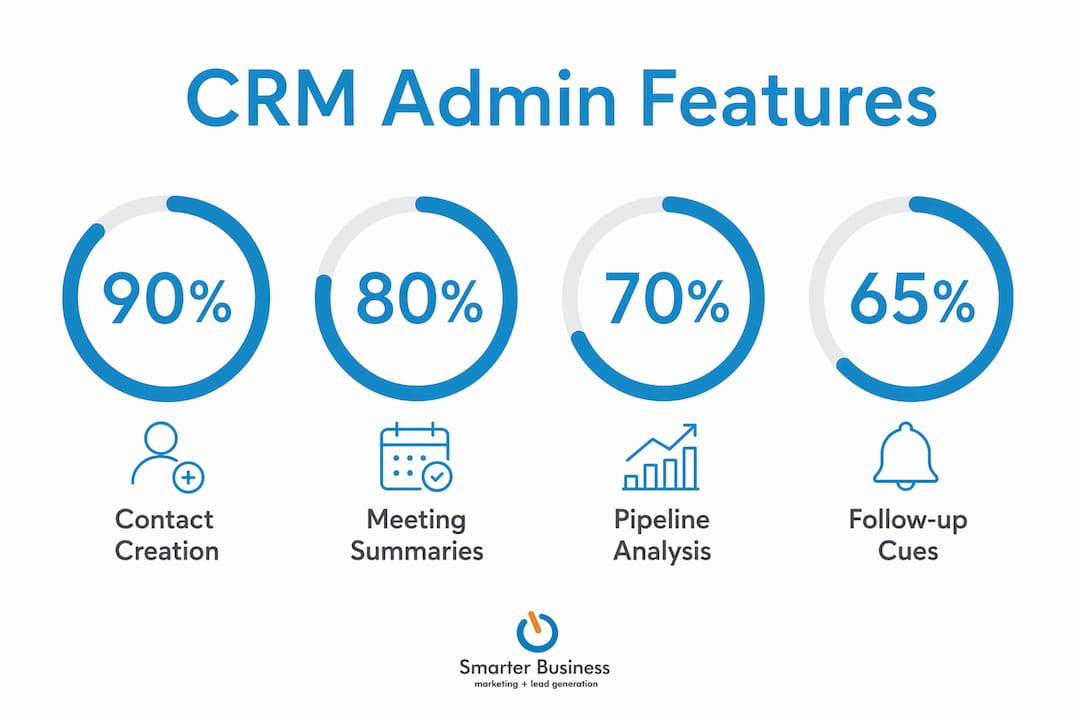
AI-powered CRM agents now handle contact creation, meeting summaries, and pipeline analysis autonomously. That combination alone reclaims the equivalent of a full working day each week for most sales-focused teams.
Pipeline analysis deserves special mention. Most managers spend hours each week pulling together deal status reports from spreadsheets that are already out of date by the time they are finished. A well-configured CRM gives you that visibility in real time, without a single manual update.
Pro Tip: If your team still uses a spreadsheet to track pipeline, that is your single highest-value automation target. Move it into your CRM first, before tackling anything else.
AI-driven sales cues built into modern CRM platforms also flag the right moment to follow up, removing yet another mental task from your team’s plate.
How to apply CRM frameworks to maximise admin reduction
Knowing that CRM reduces admin is one thing. Getting your business to actually experience that reduction requires a structured approach. Here is a practical sequence that works.
-
Audit your workflows first. Use the Four Pillars framework to map every manual task your team performs. Categorise each task by frequency, time cost, and whether it requires human judgement. This audit tells you exactly where to automate and where to leave a human in the loop.
-
Apply the 70/30 rule. Identify the 70% of tasks that are purely mechanical, data entry, scheduling, reminders, status updates, and automate them. Protect the 30% that require relationship skills, negotiation, or strategic thinking.
-
Shift your data capture culture. Move from manual entry to passive auto-logging by connecting your calendar and email to your CRM. This single change removes the biggest daily friction point for most teams. Tailored CRM software for SMEs makes this connection straightforward to configure.
-
Get leadership involved early. A CRM culture shift stalls when managers still ask for manual reports. When leadership uses the CRM as their primary source of truth, the rest of the team follows.
-
Train your team on the features that matter most. Adoption fails when teams know the CRM exists but not how to use it properly. Focus training on the three or four features that directly reduce their daily admin load.
The CRM implementation process for SMEs follows a similar logic: start with process clarity, then configure the technology to match your actual workflows, not the other way around.
Key takeaways
CRM reduces administrative workload most effectively when automation is applied to clean, documented processes, and when teams shift from manual data entry to passive, auto-logging systems.
| Point | Details |
|---|---|
| Audit before automating | Map manual workflows with the Four Pillars framework before switching on any automation. |
| Target the biggest time drains | AI agents cut data entry by up to 90% and meeting admin by over 70%, making these the highest-value starting points. |
| Apply the 70/30 rule | Automate low-value repetitive tasks and preserve human input for strategic, relationship-led work. |
| Fix data fragmentation first | Fragmented data limits CRM returns regardless of software quality. Consolidate before configuring. |
| Leadership drives adoption | Culture shifts to auto-logging only succeed when managers model the behaviour and use the CRM as their primary tool. |
What I have learned after years of CRM consultancy
After working with SMEs across Ireland since 2014, the pattern I see most often is this: a business buys a CRM, spends a week setting it up, and then wonders six months later why the team still uses spreadsheets. The technology was never the problem.
The businesses that genuinely reduce their admin load share one habit. They spend as much time documenting their current processes as they do configuring the CRM. They know exactly what they are automating before they automate it. That clarity is what separates a CRM that transforms a business from one that collects dust.
I am also watching AI agents evolve from novelty to necessity. The ability to auto-log a call, generate a summary, and create a follow-up task without a human touching the keyboard is no longer a premium feature. It is becoming the baseline expectation. The businesses that adopt this now will have a significant head start.
My honest advice: start small, start with your biggest pain point, and get one win under your belt before expanding. A CRM that your team actually uses is worth ten times more than a perfectly configured system nobody opens.
— Patrick Lennon
How Smarterbusiness helps you cut admin with CRM
Smarterbusiness works with Irish SMEs to configure CRM systems that fit how your business actually operates, not how a software manual says it should.
Whether you need CRM training to get your team using the system properly, or a full CRM consultancy engagement to audit your workflows and build an automation plan, Smarterbusiness brings practical, operational experience to every project. As a certified Act! CRM consultancy, the focus is always on your processes first and the technology second. If you are ready to reclaim those 8–12 hours per week, the conversation starts at Smarterbusiness.
FAQ
What is the role of CRM in reducing admin?
CRM reduces admin by automating repetitive tasks such as data entry, meeting scheduling, follow-up reminders, and pipeline updates. Advanced CRM automation can cut administrative workload by up to 80%, saving 8–12 hours per team member each week.
How does CRM simplify admin tasks for small businesses?
CRM connects email, calendar, and contact records into one platform, replacing manual data entry with passive auto-logging. This removes the most time-consuming daily admin tasks without requiring extra effort from your team.
What is the 70/30 rule in CRM automation?
The 70/30 rule advises automating at least 70% of low-value, repetitive admin tasks while keeping 30% of work human-led for strategic decisions and relationship management. This balance protects customer experience while maximising efficiency.
Which CRM features reduce administrative workload the most?
AI-powered contact creation, meeting intelligence tools, and pipeline analysis features deliver the fastest admin reductions. These features can cut manual data entry by up to 90% and meeting-related admin by over 70%.
Why do CRM projects fail to reduce admin as expected?
CRM projects underdeliver when businesses automate flawed or undocumented processes. Fixing and mapping workflows before applying automation is the most reliable way to achieve genuine, lasting admin reduction.