You have 0 items in your cart

CRM implementation is the structured process of deploying, configuring, migrating data into, and training your team on a customer relationship management system. Done well, it centralises your customer data, replaces the chaos of spreadsheets, and gives your whole team a single source of truth. Done badly, it is like trying to catch a greased pig in a field: expensive, exhausting, and nobody ends up happy. This article walks you through every phase of the CRM implementation process explained in plain terms, so you can plan your rollout with confidence rather than crossed fingers.
What are the key phases of a CRM implementation process?
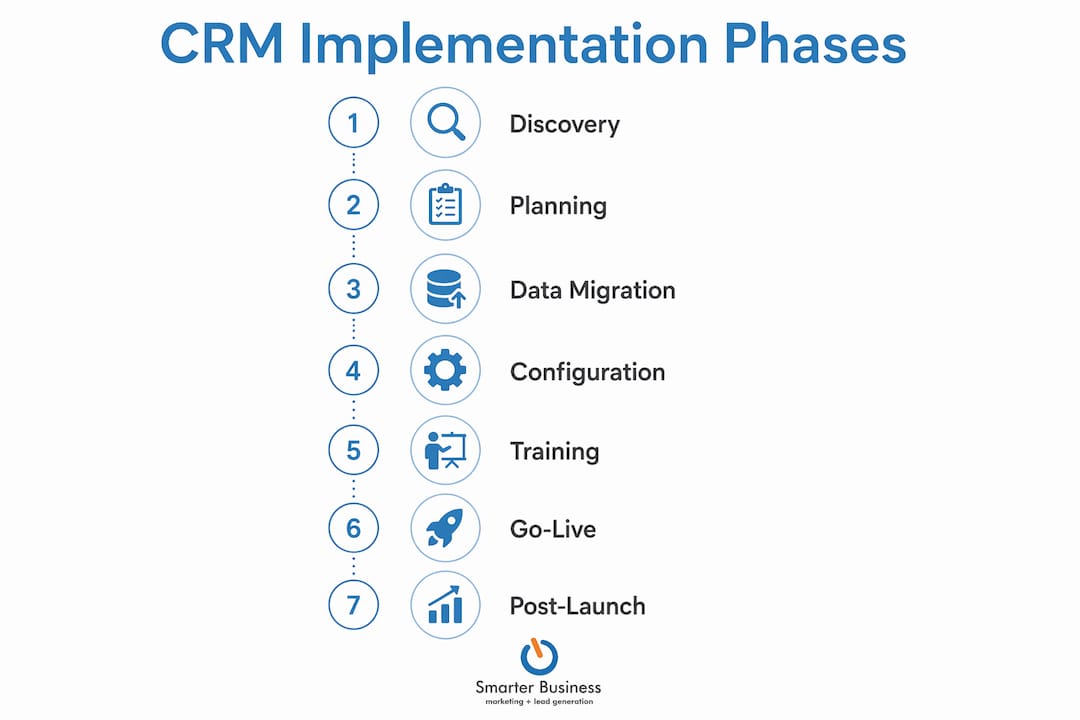
A CRM deployment is not a single event. Phases overlap and skipping any one of them causes problems downstream, often expensive ones. Think of it less like flipping a switch and more like building a house: the foundations have to be solid before you put the roof on.
Here is the sequence that works:
- Discovery and requirements gathering. Map your current workflows, identify which teams will use the system, and define what success looks like. A sales manager and a customer service rep need very different things from the same platform.
- Data audit and migration planning. Audit every spreadsheet, inbox, and legacy database before a single record moves. This is where most projects stall.
- Configuration and custom development. Build pipelines, set permissions, and configure automation to match how your business actually operates.
- Integration with existing tools. Connect your CRM to your email, accounting software, or marketing platform one system at a time.
- Quality assurance and user acceptance testing (UAT). Test on real devices with real users before going live. Surprises at this stage are cheap. Surprises after go-live are not.
- Staged rollout with role-specific training. Start small, gather feedback, then scale. More on this below.
- Ongoing iteration and optimisation. The CRM you launch on day one is not the CRM you want on day 365. Build in regular reviews from the start.
Why is data quality the real bottleneck in CRM migration?
Most CRM projects do not fail because of the software. CRM failures trace back to poor data quality, not technical import problems. Importing corrupt or duplicate records is like pouring muddy water into a clean glass: the glass does not fix the water.
Before migration, your data audit should cover:
- Deduplication. Merge or delete duplicate contacts and company records. One contact appearing six times under six slightly different names is a needle-in-a-haystack problem waiting to happen.
- Standardisation. Agree on naming conventions, date formats, and field structures before a single row moves.
- Field mapping. Every source field must map to a destination field, or you need a documented decision explaining why it does not migrate.
- Sample verification. Pull 20–30 random records after a test import and check them manually. Automated validation catches most errors; human eyes catch the rest.
Data migration is primarily a data quality problem, not a technical one. Fix the data before you touch the import tool, and the technical side becomes almost straightforward.
Pro Tip: Always run your first migration into a sandbox environment. A sandbox and rollback plan protect your live data if something goes wrong, and something almost always does on the first pass.
How to configure and integrate your CRM system effectively
Configuration is where your CRM stops being generic software and starts being your business’s tool. The temptation is to build everything at once. Resist it. Heavy customisation and complex automation, added too early, create a system so tangled that your team avoids it entirely.
Practical configuration principles:
- Match pipeline stages to reality. If your sales process has five real stages, build five stages. Do not add stages because they sound professional.
- Challenge every custom field. Ask “will someone actually use this data?” before adding it. Unused fields clutter every record.
- Adopt a restrictive-first approach to permissions. Start with minimal access and open it up as needed, rather than granting everything and trying to claw it back.
- Build automation gradually. Start with the two or three processes that eat the most time, such as follow-up reminders or lead assignment. Add more once those are stable.
Integration is a separate discipline. Understanding why CRM integrations matter for business growth helps you prioritise which connections to build first. Connect one external system at a time, test it thoroughly, and only then move to the next. Connecting everything simultaneously makes it nearly impossible to diagnose what broke and why.
Pro Tip: Test your configured CRM on the actual devices your team uses daily. A workflow that looks perfect on a desktop can be a nightmare on a mobile phone in a warehouse.

What are the best practices for CRM training, rollout, and adoption?
A CRM rollout that skips proper training is like handing someone car keys without telling them which pedal is the brake. Role-specific, hands-on training consistently outperforms generic overview sessions when it comes to adoption rates. People learn by doing, not by watching slides.
Effective rollout practices include:
- Train your CRM administrator deeply before anyone else touches the system. They are your internal expert and first line of support.
- Pilot with a small group first. A team of five to ten people will surface workflow gaps that no amount of planning anticipates.
- Communicate the “what’s in it for me” to each user group. Sales teams care about pipeline visibility. Customer service teams care about contact history. Speak to both audiences differently.
- Provide a clear escalation path. Users who hit a wall and have nobody to call will simply stop using the system.
- Keep the feedback loop open after launch. The first two weeks reveal more about your configuration than months of planning ever could.
How to optimise and govern your CRM post-launch
Launching your CRM is not the finish line. Post-launch reviews at 30, 60, and 90 days prevent the system from drifting out of alignment with your actual business processes. Without governance, CRM systems accumulate unused fields, broken automations, and workarounds that nobody can explain.
Assign a permanent CRM owner inside your organisation. This person approves change requests, manages user access, and keeps the system tidy. Without ownership, the CRM becomes everyone’s problem and nobody’s responsibility.
Active user feedback after launch identifies friction points before they become reasons to abandon the system. Schedule short monthly check-ins with key users during the first quarter. Use the data your CRM generates to measure pipeline velocity, contact engagement, and team activity. That data is the whole point of the exercise.
Pro Tip: Create a simple change request process. When someone wants a new field or workflow, they submit a short written request. This prevents CRM sprawl and keeps your system clean.
| Review milestone | Focus area |
|---|---|
| 30 days post-launch | User adoption rates and login frequency |
| 60 days post-launch | Data quality and pipeline accuracy |
| 90 days post-launch | Automation performance and integration stability |
Key takeaways
A successful CRM deployment depends on clean data, phased configuration, role-specific training, and structured post-launch governance from day one.
| Point | Details |
|---|---|
| Data quality first | Audit, deduplicate, and map all data before any technical migration begins. |
| Phase your rollout | Pilot with a small group, gather feedback, then scale to the wider team. |
| Budget for surprises | A 25% contingency fund covers the configuration and integration issues that always appear. |
| Assign CRM ownership | One named person inside your business must own the system, or nobody will. |
| Review regularly | Schedule 30, 60, and 90-day post-launch reviews with measurable benchmarks. |
What I have learned about CRM implementation after a decade with Irish SMEs
After working with SMEs across Ireland since 2014, I can tell you the pattern is remarkably consistent. The businesses that struggle with CRM implementation almost always share the same three problems: they rushed the data migration, they skipped meaningful training, and they had no executive sponsor willing to champion the system when the initial enthusiasm faded.
The 25% contingency budget recommendation is not pessimism. It is realism. Every implementation I have been involved with has surfaced at least one integration quirk or data issue that nobody anticipated. The businesses that budgeted for it sailed through. The ones that did not had to make uncomfortable choices mid-project.
The other thing I would push back on is the idea that a CRM goes “live” on a single date. The most successful rollouts I have seen treated launch day as the beginning of the real work, not the end. Iterative deployment, where you configure the core system, get it into people’s hands, and then refine based on actual use, produces far better long-term adoption than trying to build the perfect system before anyone touches it.
Data quality is the unglamorous heart of the whole thing. Clean data in a modest CRM will outperform messy data in the most expensive platform on the market. Every time.
— Patrick Lennon
How Smarterbusiness helps SMEs get CRM implementation right
Getting a CRM deployment right the first time saves you months of frustration and a significant amount of money. Smarterbusiness has been guiding Irish SMEs through CRM consultancy since 2014, covering everything from data migration planning and system configuration to permissions, workflows, and reporting structures.

If your team needs hands-on guidance, Smarterbusiness offers Act! CRM training tailored to specific user roles, so your staff learn the parts of the system that actually matter to their daily work. Whether you are starting from scratch or rescuing a deployment that went sideways, the team at Smarterbusiness works with how your business actually operates, not how a generic software manual assumes it does. Explore the CRM customisation options available for your team and take the guesswork out of your rollout.
FAQ
What does CRM implementation involve?
CRM implementation covers deployment, data migration, configuration, integration, training, and ongoing optimisation of a customer relationship management system. Each phase builds on the previous one, and skipping any step creates problems later.
How long does a CRM rollout typically take?
Timelines vary by business size and data complexity, but most SME deployments run from six to sixteen weeks from discovery to go-live. Post-launch optimisation continues for at least 90 days.
Why do CRM implementations fail?
Poor data quality is the leading cause of CRM project failure, ahead of technical issues or software limitations. Deduplication and field mapping before migration prevent the majority of problems.
What is a CRM sandbox environment?
A sandbox is a separate copy of your CRM used for testing changes before they affect live data. Running migrations and configuration changes through a sandbox first protects your business from costly errors.
How much should I budget for CRM implementation?
Budget your core software and configuration costs, then add a 25% contingency for unforeseen integration and data challenges. This buffer covers the surprises that appear in almost every deployment.