You have 0 items in your cart

A CRM system is defined as software that centralises, automates, and analyses customer interactions across sales, marketing, and support to improve retention and drive revenue growth. The industry term is Customer Relationship Management, and it covers far more than a glorified contacts list. A well-built CRM pulls data from websites, phone calls, emails, and social media into one unified view of every customer. For business professionals weighing up whether a CRM is worth the investment, the short answer is this: if your customer data lives in three spreadsheets, two inboxes, and someone’s head, a CRM system is not a luxury. It is a necessity.
What are the main functions and types of CRM systems?
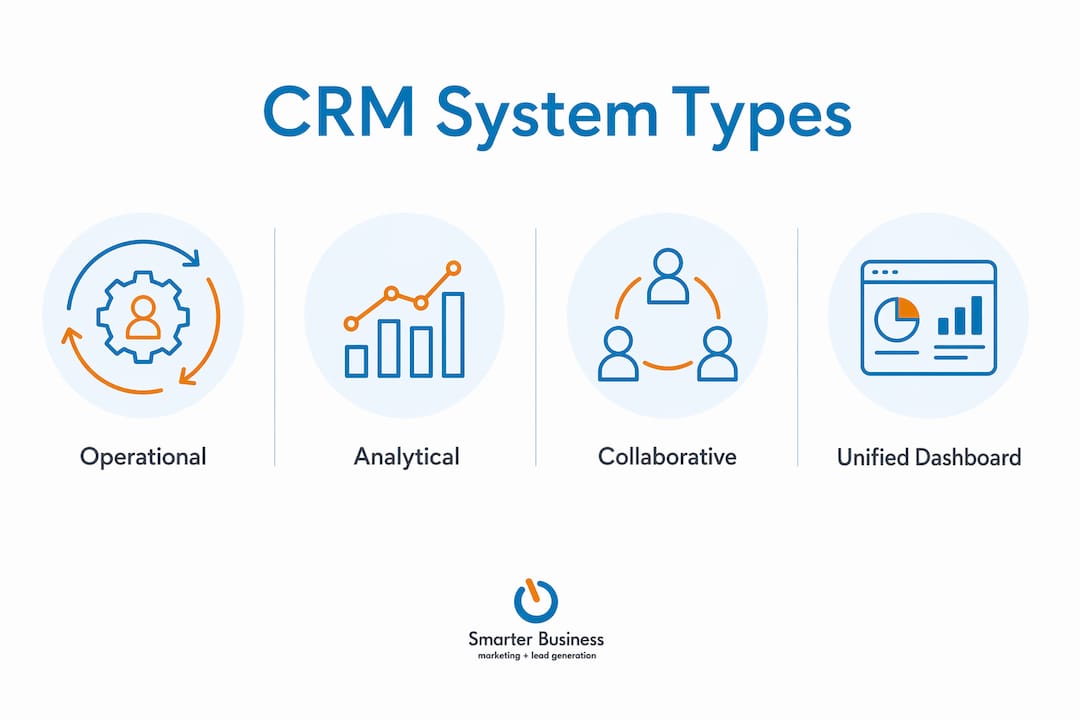
CRM systems fall into three types: operational, analytical, and collaborative. Each serves a distinct purpose, and most modern platforms combine all three.
Operational CRM handles the day-to-day mechanics. It automates sales pipelines, marketing campaigns, and customer service workflows. Think of it as the engine room: it keeps things moving without requiring a crew member to pull every lever manually.

Analytical CRM is where the intelligence lives. It identifies patterns in customer behaviour, supports forecasting, and helps your team make decisions based on data rather than gut feeling. Microsoft Dynamics 365 describes this as AI-driven insight generation that supports pricing, targeting, and customer experience improvements.
Collaborative CRM breaks down the walls between departments. Sales knows what marketing promised. Support knows what sales closed. Everyone works from the same customer record.
| CRM type | Primary focus | Typical use case |
|---|---|---|
| Operational | Task and workflow automation | Sales pipeline, email campaigns, service tickets |
| Analytical | Data analysis and forecasting | Customer segmentation, revenue reporting |
| Collaborative | Cross-department data sharing | Unified customer records, team handoffs |
The unified dashboard that sits across all three types is what makes CRM genuinely powerful. It summarises client history, sales activity, and marketing touchpoints in real time, so decisions are based on facts, not folklore.
How can businesses customise and scale CRM systems?
CRM customisation means configuring data fields, modules, and workflows to match how your business actually operates, rather than bending your processes to fit generic software. That distinction matters enormously. Customised CRM solutions produce better data, higher user adoption, and stronger long-term return on investment than off-the-shelf deployments used straight out of the box.
The most reliable approach follows a clear hierarchy. Start with data structure: get your fields, categories, and contact records right before touching anything else. Skipping this step leads directly to inaccurate data and operational confusion down the line. Once the structure is solid, layer in automation. Then refine the user experience. Finally, build in continuous learning by reviewing performance data and adjusting accordingly.
This is what Smarterbusiness calls the “start small, think big” model. Modular CRM deployment prevents feature creep and keeps the system aligned with each phase of business growth. You do not need every bell and whistle on day one. You need the right foundation.
- Begin with clean data architecture before any automation
- Add automation only after workflows are mapped and tested
- Refine dashboards and user views based on real team feedback
- Review and adjust the system quarterly, not annually
- Scale modules as the business adds headcount or new processes
Pro Tip: Avoid the temptation to replicate every existing process in the CRM on launch day. Pick the three workflows that cause the most friction and fix those first. Everything else can follow.
For businesses thinking about CRM scalability for SMEs, a phased rollout is almost always the right call.
What practical benefits do CRM systems deliver?
CRM automation frees your team from repetitive tasks: data entry, lead scoring, follow-up reminders, and pipeline updates. That time goes back to actual customer conversations. The practical gains show up quickly across sales, marketing, and service.
Better customer segmentation is one of the clearest wins. When all your contact data sits in one place, targeted campaigns stop being a guessing game. You can filter by industry, purchase history, or last contact date and send the right message to the right person at the right moment. That is the difference between a newsletter and a conversation.
Sales pipeline management becomes far less like herding cats. Every lead has a status, an owner, and a next action. Nothing falls through the cracks because the system flags it before it disappears. The role of CRM in customer retention is particularly strong here: consistent follow-up, driven by automated reminders, keeps existing customers engaged without relying on memory.
Key benefits business professionals report from CRM adoption include:
- Reduced time spent on manual data entry and admin
- Faster response times to customer enquiries
- Improved lead conversion through structured pipeline management
- More accurate sales forecasting based on live pipeline data
- Stronger customer retention through consistent, timely follow-up
What makes CRM adoption succeed or fail?
CRM success depends more on user adoption than on the technology itself. That is the uncomfortable truth most software vendors gloss over. A system configured to mirror natural workflows achieves higher engagement and faster return on investment than one that forces teams to change how they work.
Poor adoption almost always traces back to the same root cause: the software was imposed on users rather than built around them. Role-based access is a practical fix. A salesperson does not need to see finance dashboards. A support agent does not need the full marketing module. Giving people a clean, relevant view of the system removes friction and builds confidence.
CRM systems must evolve after launch. Treating go-live as the finish line is a common and costly mistake. Usage data tells you which features teams actually use and which ones gather digital dust. Act on that data.
Pro Tip: Appoint an internal CRM champion, not just an IT contact, but someone from sales or operations who uses the system daily and can translate team frustrations into configuration changes.
Structured CRM adoption and rollout also benefits from executive sponsorship. When leadership uses the system visibly, the rest of the team follows. When leadership bypasses it, so does everyone else. Pairing IT consulting best practices with a clear internal change management plan significantly improves the odds of a successful deployment.
- Assign role-based access so each user sees only what they need
- Run short, role-specific training sessions rather than one-size-fits-all demos
- Review adoption metrics monthly for the first six months
- Collect user feedback formally at the 30-day and 90-day marks
- Adjust workflows based on what the data shows, not what was planned
Key takeaways
A CRM system delivers its full value only when it is configured to fit your business, adopted by your team, and continuously refined based on real usage data.
| Point | Details |
|---|---|
| Core CRM definition | A CRM centralises customer data from all channels into one unified, actionable view. |
| Three CRM types | Operational, analytical, and collaborative CRM each serve a distinct but complementary role. |
| Customisation hierarchy | Build data structure first, then automation, then user experience, then continuous optimisation. |
| Adoption is the real challenge | Systems configured around existing workflows achieve higher engagement and faster ROI. |
| Continuous evolution | CRM is never finished. Review usage data and adjust the system as your business grows. |
Why I think most businesses get CRM backwards
After working with SMEs across Ireland since 2014, I have seen the same pattern repeat itself. A business buys a CRM, spends weeks on setup, and then watches adoption collapse within three months. The reason is almost always the same: the system was built around the software’s logic, not the business’s logic.
The businesses that get genuine value from CRM are the ones that treat it as an operational tool first and a technology purchase second. They map their actual workflows before touching a single configuration screen. They involve the people who will use the system daily in the design process. And they accept that the first version will not be perfect.
What I tell every client at Smarterbusiness is this: your CRM should feel like it was built for your business, not borrowed from someone else’s. That takes time, honest conversation, and a willingness to revisit decisions. But it is the only approach that produces a system your team will actually use. A CRM sitting unused is not a CRM. It is an expensive filing cabinet.
— Patrick Lennon
How Smarterbusiness helps you get CRM right
Getting a CRM system up and running is one thing. Getting it to stick is another matter entirely. Smarterbusiness has been helping Irish SMEs build CRM systems that their teams actually use since 2014, working as certified Act! CRM consultants rather than software resellers.
Whether you need bespoke CRM customisation to align the system with your workflows, or structured CRM training to bring your team up to speed, Smarterbusiness offers practical, hands-on support at every stage. The focus is always on making the system work for your business, not the other way around. Get in touch to discuss what a properly configured CRM could do for your sales and customer management.
FAQ
What is a CRM system in simple terms?
A CRM system is software that stores and manages all your customer information, interactions, and sales activity in one place. It replaces scattered spreadsheets and inboxes with a single, organised view of every customer relationship.
What does CRM customisation mean?
CRM customisation means configuring the system’s fields, workflows, and modules to match your specific business processes rather than using a generic default setup. A well-customised CRM produces better data and higher team adoption.
What does CRM integration mean?
CRM integration connects your CRM to other business tools, such as email platforms, accounting software, or web forms, so data flows automatically between systems without manual entry.
What is a CRM audit?
A CRM audit is a structured review of how your CRM system is configured, used, and maintained. It identifies gaps in data quality, unused features, and workflow inefficiencies so the system can be improved.
What does a CRM consultant do?
A CRM consultant assesses your business processes and configures the CRM to match them, then supports training and ongoing optimisation. The goal is a system your team uses confidently, not one that gathers dust.