You have 0 items in your cart

Launch a one-page v1 scope, pilot it with two or three reps, and run 30/60/90 checkpoints with a named sponsor. That sequence, not a longer feature list or a bigger training budget, is what turns a new CRM from an expensive filing cabinet into something your sales team actually opens every morning. Start this week with a 90-minute pipeline design session involving two reps and your sales lead, and consider Smarter Business Services if you want a steady hand guiding the process.
TL;DR:
- Focusing on small, rapid pilots with clear scope and checkpoints increases CRM adoption more effectively than lengthy, feature-heavy rollouts.
- Assigning explicit ownership roles for each phase, such as sponsors, project leads, and champions, prevents delays and fosters accountability.
- Delivering just-in-time, task-specific training and involving reps in design stages boosts engagement and reduces resistance.
- Preparing and rehearsing clean, minimal data migration ensures trust on launch day, with core data like open deals and active contacts prioritized.
- Monitoring practical behaviors, like next-step completions and stage changes, provides real evidence of adoption beyond login metrics.
Table of Contents
- What is CRM change management and why does it decide success or failure?
- How do you run a phase-based CRM rollout that people actually use?
- Who should own each part of the CRM change?
- What training actually gets people using the CRM?
- How do you prepare and migrate data without breaking trust on day one?
- What metrics prove your CRM adoption is actually working?
- What mistakes derail most CRM change projects?
- How does Smarter Business support CRM change management?
- How do you keep people talking through the whole rollout?
- How do you handle resistance without it derailing the project?
- How do you keep improving the CRM after go-live?
- How does CRM change fit into your wider business processes?
- Should you self-implement or bring in a partner?
- Smarter Business: practical next steps and how to engage
- Sources
- FAQ
What is CRM change management and why does it decide success or failure?
CRM change management is the discipline of preparing, supporting, and leading your people through the shift to a new system, so the tool actually gets used rather than quietly ignored. Projectmanagement draws a useful line here: project management gets the software installed on time and on budget, but change management is what gets a salesperson to log a call instead of scribbling it on a sticky note. Confuse the two and you’ll ship a perfectly configured system nobody touches.
Here’s the uncomfortable truth most CRM vendors won’t lead with: configuring the software is the easy half of the job. Harvard Business Review’s analysis of failed CRM projects found that most failures trace back to neglecting the human and process side, not the technology. You can buy the sharpest CRM on the market and still watch it become a digital chocolate teapot if nobody’s bought into using it.
That’s where a phase-based rollout earns its keep. Rather than trying to design the perfect system on paper and then unveiling it in one big-bang launch, you scope small, pilot fast, and expand only once people trust the thing works. Prosci’s guidance on adapting change management to Agile CRM projects backs this up directly: build change activities into iterative cycles, keep a sponsor visibly involved, deliver training just in time, and expect resistance rather than being surprised by it.
The rest of this guide walks through exactly how to sequence that work, who owns each piece, and the metrics that tell you whether adoption is real or just wishful thinking.
How do you run a phase-based CRM rollout that people actually use?
A phased rollout beats a single dramatic launch for one simple reason: it lets you fail small, learn fast, and fix problems before they touch your whole sales team. Rework’s CRM implementation guide lays out a sequence that consistently produces faster adoption and less rework than trying to build the “complete” system from day one: name the decision, design a one-page v1, configure that minimal version, load clean starting data, pilot it, then roll out and check in at 30, 60, and 90 days.
Think of your v1 scope like packing for a weekend trip rather than emigrating. You don’t need every feature, every custom field, and every automation rule before go-live. You need a pipeline that matches how your team actually sells, a handful of required fields, and two reports that answer the questions your sales manager asks every Monday morning.
The one-page v1 scope template
Write this on a single page, literally. If it doesn’t fit, you’re over-scoping.
- Pipeline and stages: the 4 to 6 stages a deal actually passes through, named the way your reps already talk about them.
- Required fields: as few as possible. Next-step date is the one field that predicts whether a deal is actually being worked, according to practical CRM implementation best-practice guidance.
- Two reports: usually a pipeline-by-stage view and an activity-by-rep view. Resist the urge to build a dashboard for every department on day one.
- Explicit exclusions: list what you’re deliberately leaving out of v1 (marketing automation, custom quoting, territory rules) so nobody quietly tries to smuggle them in.
The phase table
| Phase | Owner | Duration | Output |
|---|---|---|---|
| Name the decision | Executive sponsor | 1 week | Signed-off business case and success criteria |
| Design v1 | Project lead + 2 reps | 90 minutes to 1 week | One-page v1 scope document |
| Configure v1 | CRM admin | 1 to 2 weeks | Working pipeline, fields, and two reports |
| Load starting data | Data lead | 1 to 2 weeks | Clean, deduplicated dataset for open deals and active accounts |
| Pilot | Project lead + pilot reps | 2 to 4 weeks | Pilot feedback log and adjusted v1 |
| Rollout | Project lead + champions | 1 week | Full team access and go-live communication |
| 30/60/90 checkpoints | Executive sponsor + project lead | Ongoing through 90 days | Go/no-go decisions and corrective actions |
A 90-minute design session with your sales lead and two frontline reps is enough to draw the pipeline and write exit criteria for each stage. Reps who help draw the stages tend to defend them later, rather than treating the CRM as something imposed from above. For SMEs specifically, SMB-focused change guides show the whole sequence, from scoping to go-live, typically running 3 to 8 weeks rather than the multi-quarter timelines enterprise projects assume. Our CRM implementation checklist for small businesses walks through the same phases in more granular, copy-paste detail.
The sequencing matters more than the individual steps. Configure before you’ve piloted and you’ll build features nobody asked for. Skip the pilot and go straight to full rollout, and you’ll discover your data model’s flaws in front of the entire sales team at once, which is a considerably worse audience for that particular surprise.
Who should own each part of the CRM change?
Ambiguous ownership is the single fastest way to stall a CRM rollout. Someone needs to be answerable for each decision, and “the IT department” is not an answer, it’s an evasion.
Here’s how the roles typically split on an SME rollout:
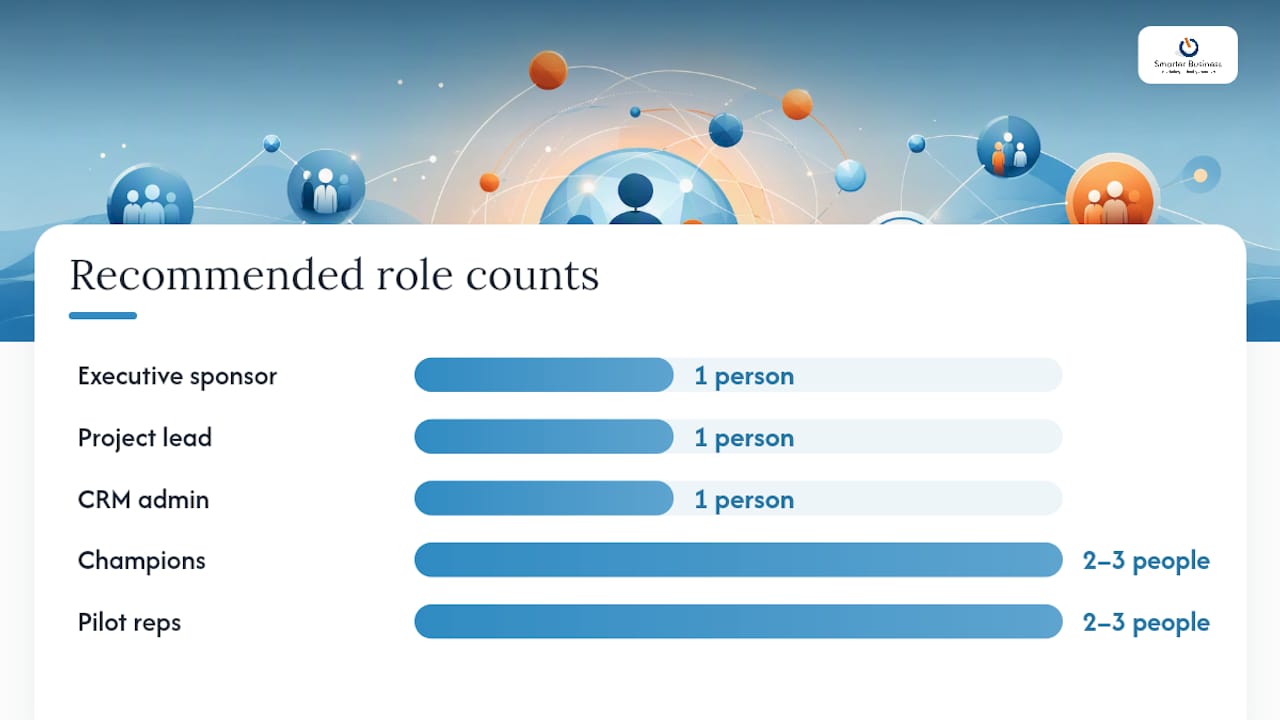
- Executive sponsor: signs off the business case, removes organisational roadblocks, and shows up visibly at each checkpoint. This is not a rubber-stamp role. Prosci’s Agile CRM guidance treats leadership sponsorship as one of the non-negotiable ingredients, alongside just-in-time training and an integrated change team.
- Project lead: owns the timeline, chairs the design sessions, and makes the go/no-go call at each checkpoint.
- CRM admin: configures the pipeline, fields, and reports, and keeps the system tidy once live.
- Data lead: inventories, cleans, and maps the data that goes into v1.
- Champions: two or three enthusiastic early adopters who answer colleagues’ questions on the floor rather than routing everything through IT.
- Pilot reps: the two or three people who test v1 before it reaches the wider team, and whose feedback shapes the adjusted version.
Choosing champions is worth some care. Pick people who are already respected by their peers, not necessarily the most senior person in the room. Peer-to-peer influence from a trusted colleague outperforms top-down mandates by a wide margin, because a pilot success story from someone at the next desk lands very differently than a memo from management.
Brief champions clearly: their job is to model good habits, field quick questions, and flag friction back to the project lead, not to become unpaid support staff. Capgemini’s persona-based change framework recommends mapping the specific impact on each role before you assign champions, so training and messaging can be tailored rather than generic.
At each checkpoint, run a short accountability check: has the sponsor been visible this month? Is the project lead making decisions or deferring them? Are champions actually fielding questions, or has that fallen back on the CRM admin? If any answer is no, fix it before moving to the next phase.
What training actually gets people using the CRM?
Training too early is almost as damaging as training too late. Teach people a system that then changes shape during the pilot, and you’ve taught them the wrong habits. The Prosci research on Agile CRM change is blunt about this: just-in-time training, delivered close to when people will actually use the skill, sticks considerably better than training delivered weeks before go-live.
A workable training sequence looks like this:
- Pilot reps get hands-on sandbox training during the pilot phase, using real (anonymised) data rather than dummy records that nobody recognises.
- Champions get a slightly deeper session just before rollout, covering not just the “how” but the “why,” so they can answer colleagues’ questions convincingly.
- The wider team gets short, task-specific sessions in the week of go-live, not a month before.
- Everyone gets access to quick-reference material they can consult in the moment, rather than trying to remember a 90-minute onboarding webinar from three weeks ago.
On format: five to ten minute video clips beat hour-long webinars for retention, because nobody remembers slide 34 of anything. Pair those with a one-page cheat-sheet for the two or three tasks people do daily, and let champions walk small groups through the sandbox using live-looking data rather than “Test Company Ltd.” Our Act! CRM training services follow broadly this shape: short, role-specific sessions timed to the pilot and rollout rather than one long session dumped at the start.
Pro Tip: Run a five-minute “show me” check two weeks after go-live: ask each rep to log a deal update live in front of you. It surfaces confusion faster than any survey, and it costs almost nothing.
Measure training effectiveness by watching behaviour, not attendance. If reps who sat through training are still emailing deal updates to the sales manager instead of logging them, the training didn’t land, whatever the feedback form said. Run a refresh session at the 30-day checkpoint for anyone still struggling, rather than waiting for a formal quarterly review.
How do you prepare and migrate data without breaking trust on day one?
Nothing kills confidence in a new CRM faster than a rep searching for their biggest deal on launch day and finding it isn’t there. Data preparation deserves the same rigour as the pipeline design, arguably more, because a bad first impression is very hard to undo.
Start in week one with an honest inventory. List every spreadsheet, inbox, and legacy system currently holding customer information, and be ruthless about which ones are actually current. Deduplicate contacts and accounts before you map anything, because migrating duplicates just gives your new CRM the same mess in a shinier interface. Map each surviving field to your one-page v1 data model, which, per practical CRM implementation advice, should stay deliberately simple: company, contact, deal, activity, and not much else at the start.
- Week 1: inventory every data source and flag which ones are stale, duplicate, or simply wrong.
- Weeks 2 to 3: deduplicate and map surviving records to the v1 model, prioritising open deals and active accounts.
- Four weeks before go-live: rehearse the cutover using full-volume sandbox data, not a small sample.
- Go-live minus one week: run final validation checks and freeze the source data to prevent last-minute drift.
That rehearsal step is easy to skip and expensive to skip. CRM Curator’s implementation research found that cutover rehearsals against full-volume sandbox data, run at least four weeks before go-live, surface migration surprises while there’s still time to fix them quietly, rather than in front of your entire sales team on launch morning.
For v1, migrate only what people need immediately: open deals, their linked accounts, and active contacts. Defer bulk historic data, closed-lost archives, and five-year-old marketing lists to a v2 project once the core system is trusted and working. Our CRM implementation checklist breaks this migration sequencing down in more detail if you’re building the plan yourself.
What metrics prove your CRM adoption is actually working?
Attendance at training sessions and login counts are vanity metrics. They tell you people opened the system, not that they’re using it to actually run their sales process. The signal you want is behavioural: is the CRM shaping how deals move, or is it just where deals get logged after the real decisions happened somewhere else?
Four metrics carry genuine signal:
- Share of open deals with a next-step date filled in. This single field, flagged by practical implementation guidance as the best early indicator, tells you whether a deal is actively being worked or quietly stalled.
- Stage change frequency. Deals that sit in the same stage for weeks are either genuinely slow or, more often, not being updated.
- Median days since last activity. A rising median across the pipeline is an early warning that logging has stopped, well before anyone admits it out loud.
- Percentage of deals created before the first meeting. A low number here often means reps are still qualifying leads off-system before bothering to log them.
Reps who help design pipeline stages during a 90-minute session are considerably more likely to defend and use those stages after launch, compared with stages handed down from above without their input.
Build your checkpoint template around one question per milestone. At day 30, ask: are pilot reps logging next-step dates without being chased? Gather evidence from the dashboard, not from asking people how they feel about it. If the answer is no, the corrective action is usually simplifying required fields further, not adding more training. At day 60, ask whether stage change frequency across the wider team matches the pilot’s pattern. At day 90, ask whether the metrics have stabilised without active management, which is the real test of adoption.
A simple dashboard, built from the two reports in your v1 scope, is enough. The project lead should own it during the pilot and rollout, then hand ownership to the executive sponsor once the 90-day checkpoint confirms adoption has stuck. Project and task management resources like Seven’s guides on running structured checkpoints offer useful templates if you want a more formal cadence for tracking these milestones.
What mistakes derail most CRM change projects?
Most CRM failures follow a small, repeatable set of patterns. Spotting them early costs you an afternoon; missing them costs you a failed rollout and a demoralised sales team.
- Configuring before designing. Building fields and automations before you’ve run a design session with actual reps means building for a pipeline that exists only in your head. Fix: run the 90-minute design session first, configure second.
- Big-bang launches. Rolling out to the whole company on one date, with no pilot, means every problem surfaces at maximum volume simultaneously. Fix: always pilot with two or three reps first.
- No named owner after go-live. Enthusiasm fades within weeks if nobody’s accountable for the system once the project “finishes.” Fix: hand ownership explicitly to the sponsor at the 90-day checkpoint, not informally.
- Training delivered too early. Teaching a system that then changes during the pilot bakes in wrong habits. Fix: sequence training to the pilot and rollout phases, not the calendar.
- Going live on a Friday. It guarantees a weekend of unanswered questions and a Monday full of frustration. Fix: launch early in the week, when support is actually available.
Run a quick audit against your own plan: does it have a v1 scope on one page? A named pilot group? A sponsor who’ll actually show up at checkpoints? If any answer is no, you’ve found your risk before it’s found you. Our piece on seven signs your business needs a CRM system is worth a look if you’re still deciding whether now’s the right moment to start this process at all.
How does Smarter Business support CRM change management?
Smarter Business has spent over a decade working through exactly this playbook with small and medium businesses across Ireland, with a founder who has decades of experience in sales, marketing, and operations, not software deployment for its own sake, which shapes how engagements are structured from the first conversation.
Mapped against the phases above, the services on offer cover most of the sequence: CRM Customisation and AI Connectors for the design and configure phases, CRM Training for the pilot and rollout phases, and ongoing Support and Advice for the checkpoints that follow. Integration and Automation services handle the connective work between your CRM and the other systems your business already runs on, while Reports and Insights/Dashboards support the adoption metrics covered above.
How we work: engagements typically start with a scoping conversation about your actual sales process, terminology, and reporting needs, rather than a generic software demo. From there, configuration is tailored to fit how your team already talks about deals and stages, not the other way round.
How do you keep people talking through the whole rollout?
A one-off launch email does nothing for adoption three weeks later, when the novelty’s worn off and old habits start creeping back. Communication needs to run on a rhythm that matches your checkpoints, not a single burst at go-live.
Before the pilot, tell the wider team what’s happening and why, in plain terms: what problem this solves, who’s involved, and when they’ll be affected. During the pilot, share short, honest updates, including what’s not working yet, because a sponsor who only broadcasts good news loses credibility fast. At rollout, champions should be visibly active on the floor, not just named on a slide.
After go-live, the engagement work isn’t finished, it’s just changing shape. Send a brief update at each checkpoint (30, 60, 90 days) summarising what the metrics show and what’s changing as a result. Celebrate specific wins, a deal that closed faster because the pipeline flagged it as stalling, rather than vague praise for “great adoption.” Specific stories travel through a sales team far better than generic encouragement ever does.
Keep a standing channel, even something as simple as a weekly five-minute slot in the sales meeting, where people can raise friction points without filing a formal ticket. The moment feedback starts feeling like paperwork, it stops happening.
How do you handle resistance without it derailing the project?
Resistance isn’t a personality flaw in your sales team, it’s a signal that something isn’t yet meeting their needs. Treating it as insubordination almost always makes it worse; treating it as data almost always makes it easier to fix.
The most common root cause is a simple, unspoken calculation: “what’s in it for me?” If logging a deal update feels like extra admin that benefits management more than the rep, resistance is a rational response, not a stubborn one. Reframing the CRM as a tool that saves the rep time, fewer follow-up emails, an automatic reminder instead of a mental note, shifts that calculation. This is exactly the WIIFM (what’s in it for me) principle behind treating resistance as an unmet need rather than a discipline problem.
Cultural resistance tends to run deeper in businesses where success has always been measured by relationships and instinct rather than logged data. Here, the fix isn’t more mandates, it’s visible proof from a respected peer that the system helps rather than hinders. This is precisely why champions matter more than management memos: a pilot rep saying “this actually saved me twenty minutes today” does more work than any policy email.
Watch for resistance that shows up as silence rather than complaint, people quietly reverting to spreadsheets while nodding along in meetings. Catch it at the 30-day checkpoint by looking at actual usage data, not by asking people directly whether they’re on board. Our CRM workflow automation guide covers practical ways to automate the tedious parts of logging, which removes a lot of the resistance before it starts.
How do you keep improving the CRM after go-live?
The 90-day checkpoint isn’t a finish line, it’s the point where structured feedback needs to become a habit rather than a project milestone. Systems that stay useful three years later are the ones with a working feedback loop, not the ones that were perfectly configured on day one.
Build a lightweight mechanism for capturing friction: a shared channel, a short monthly survey, or simply the CRM admin sitting with two reps for ten minutes each month to watch how they actually use the system. Real friction shows up in behaviour, workarounds, fields left blank, reports nobody opens, long before anyone complains about it out loud.
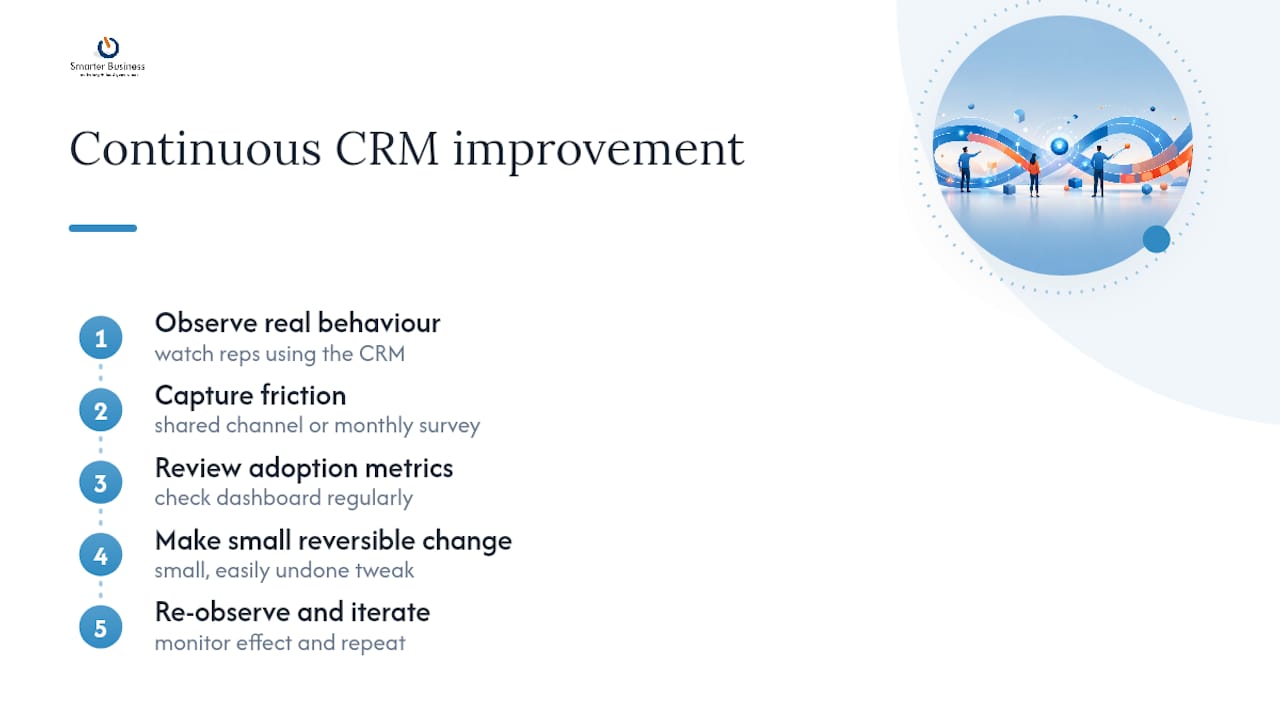
Review the adoption metrics from your dashboard on a recurring cycle, not just during the original 30/60/90 window. A metric that looked healthy at day 90 can quietly slide six months later, particularly after new hires join without the same onboarding rigour the original pilot group received.
Treat every fix as small and reversible where possible. Adding one field is easy to undo if it doesn’t help; a major structural change made on a hunch is not. This iterative approach mirrors the same logic behind the phased rollout itself, small steps, tested quickly, kept only if they earn their place.
How does CRM change fit into your wider business processes?
A CRM that lives in isolation from the rest of the business tends to decay into a glorified contact list. Real value comes from connecting it to the processes that already run the company, quoting, invoicing, marketing, and support, so data flows once and gets used many times.
That means thinking about integration early, even if you defer building it until after the v1 pilot proves itself. If your finance team re-keys deal data into a separate invoicing system, that’s a process gap the CRM should eventually close, not a permanent workaround. Our Connect and Integrate services are built around exactly this kind of connective work once the core CRM is stable.
Reporting is the other integration point that pays off quickly. If your CRM’s pipeline report and your finance team’s revenue forecast rely on two different, disconnected numbers, someone’s going to spend Monday morning reconciling spreadsheets that should have matched automatically. Aligning CRM reporting with how the business already tracks performance, rather than inventing a parallel set of numbers, removes that friction and builds trust in the system faster than any training session could.
Should you self-implement or bring in a partner?
If you’ve got fewer than ten users, a straightforward pipeline, and someone internally who can spare a day a week for two months, self-implementation is realistic. Add complex integrations, multiple departments, or no spare internal admin capacity, and a partner engagement typically works out faster and cheaper in total cost of ownership than months of trial and error. A ten-person sales team with no dedicated admin, for instance, usually reaches working adoption faster with a few weeks of guided consultancy than by learning configuration from scratch.
— Patrick Lennon
Smarter Business: practical next steps and how to engage
This consultancy approach starts with your actual workflows, terminology, and reporting structure, then configures Act! CRM to match, rather than asking your team to adapt to generic software.

Relevant services for a rollout like the one described above include CRM Customisation and AI Connectors for the design and configure phases, CRM Training for the pilot and rollout, and ongoing Support and Advice for the 30/60/90 checkpoints. A first scoping engagement typically looks like a short conversation about your pipeline, your team, and what “adoption” would actually look like for your business, closer to the 90-minute design session described earlier than a sales pitch.
If you’re licensing alongside that support, Act! Advantage plans start from €30 per month per user, with cloud and desktop options detailed on our Act! CRM pricing page. The most useful next step is a short scoping call, or a one-page v1 scope workshop, to see whether your project fits the pattern this guide describes. You can start that conversation, or explore the full range of CRM consultancy and training services, through Smarter Business today.
FAQ
What are the 7 C’s of CRM?
Definitions vary across sources, but the concept generally groups customer-focused principles, such as customer identification, communication, and consistency, under a memorable framework rather than a single fixed standard.
What are the 5 pillars of change management?
Most frameworks converge on sponsorship, communication, training, resistance management, and measurement as the core pillars, all of which map directly onto the phase-based CRM rollout described above.
What are the four stages of CRM?
A typical CRM lifecycle runs through contact acquisition, data organisation, engagement and nurturing, and retention and analysis, though the exact labels differ between frameworks.
What are CRM techniques?
Practical CRM techniques include pipeline segmentation, next-step tracking, activity logging, and persona-based communication, all built on a clean, simple data model rather than an overloaded system.
How much does Smarter Business charge for CRM support?
Act! Advantage plans are listed from €30 per month per user, with full pricing detailed on the Act! CRM pricing page; consultancy and training pricing is available on request.