You have 0 items in your cart

Connecting a website form to Act! CRM means every enquiry lands as a contact record, ready for follow-up, with no copying and pasting. You can do it with Act!’s own web form tools or with a middleware connector. Either way, the quality of the result depends on three things: clean field mapping, proper consent wording and a testing routine. Get those right and your contact page stops being a letterbox and starts being a lead engine.
TL;DR
- A web form feeding Act! creates or updates contacts automatically, so leads are never stuck in someone’s inbox.
- There are two broad routes: Act!’s own web forms, or a middleware connector between your website form tool and Act!.
- Map every form field to an Act! field before you build, including a consent field and a lead source.
- Under Irish rules, keep “answer my enquiry” separate from “send me marketing”, with an unticked box for the second.
- Test with dummy entries, including duplicates and deliberately broken ones, before going live.
Table of Contents
- What a connected form actually does for you
- Two ways to wire it up
- Before you build: the pre-flight checklist
- Mapping fields: Fat-Fingered Follies and how to avoid them
- Consent and GDPR: keep the Data Protection Commission happy
- Duplicates and failed entries: Whack-a-Mole prevention
- Testing before you go live
- Our perspective
- Getting it set up with Smarter Business
- FAQ
- Sources
What a connected form actually does for you
Picture your current process. A visitor fills in your contact form, an email pings into a shared inbox, someone copies the details into a spreadsheet on Thursday, and by Friday the lead has gone cold. It’s a bit like catching rain in a sieve.
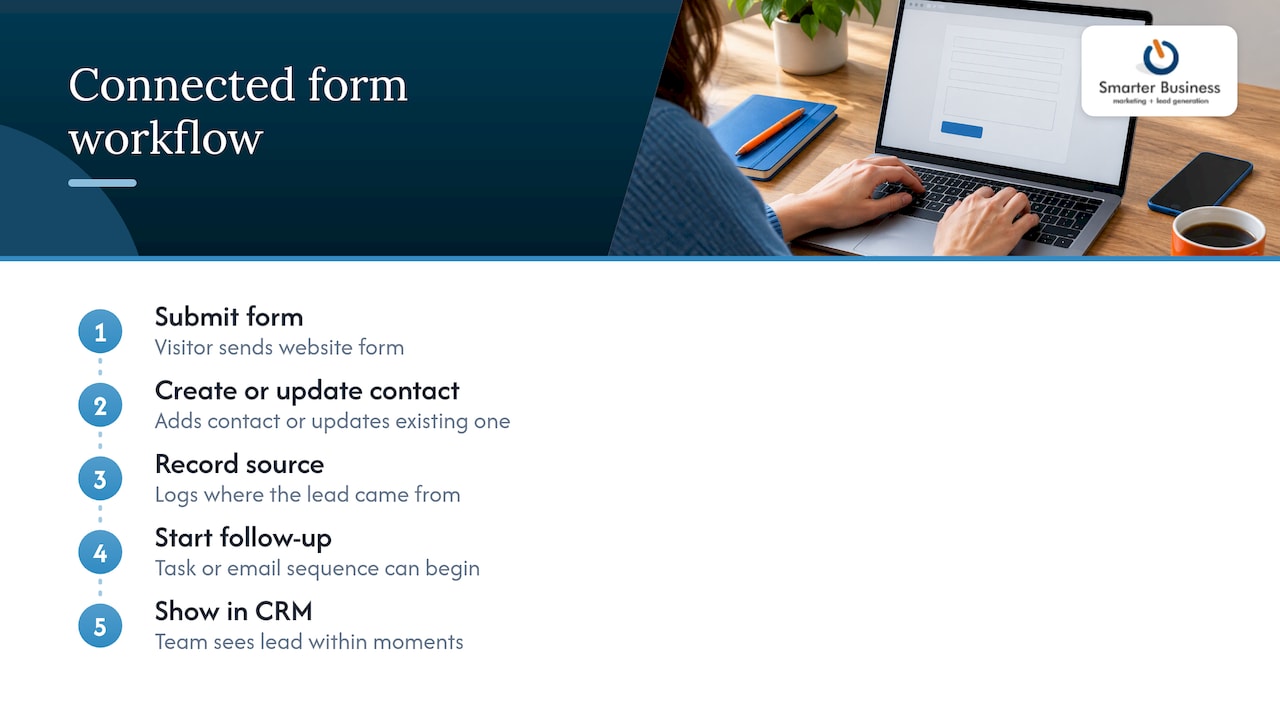
A connected form removes the sieve. The submission creates a contact (or updates an existing one), records where it came from, and can start a follow-up task or an email sequence. Your team sees the lead in the CRM within moments. We cover the business case in more detail in why you need web lead forms, and you can see the idea working in our web form demo for Act! and Act! Cloud.
Two ways to wire it up
Route one: Act!’s own web forms
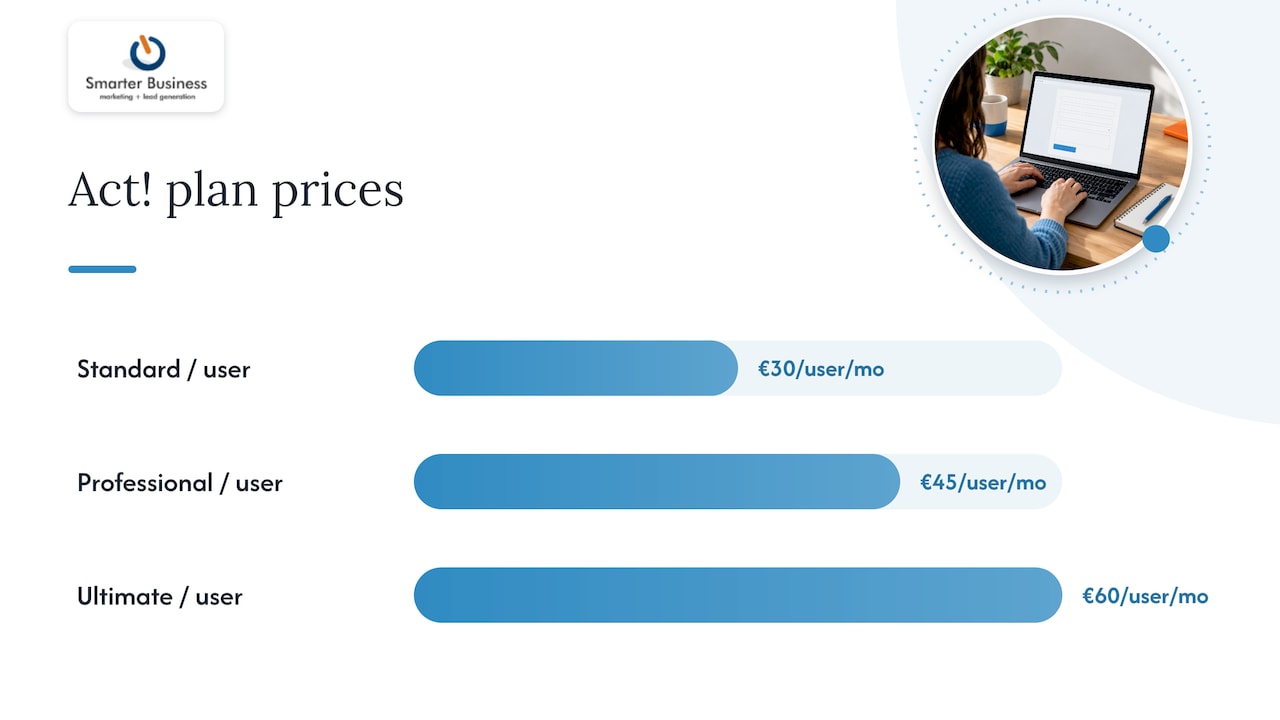
Act! includes tools for building web forms that post straight into your database. This is the tidiest option when your website is simple and you want few moving parts. Which version of Act! you hold affects what is available, so check your subscription before you build. Our Act! Advantage pricing page lists the plans: Standard is €30 per month per user, Professional €45 and Ultimate €60.
Route two: a middleware connector
If your site already uses a form plugin you love, or your forms feed several systems at once, a middleware connector can sit between the form and Act!. One form builder vendor describes middleware as a reliable and secure approach for CRM integration. The trade-off is one more service to monitor, so someone on your team needs to own it.
| Question | Act!’s own forms | Middleware connector |
|---|---|---|
| Moving parts | Fewer | One extra service |
| Best for | Simple lead capture, surveys | Existing form plugins, multi-system flows |
| Who maintains it | Your Act! admin | Your Act! admin plus the connector owner |
| Failure to watch for | Field mismatch | Field mismatch and connector errors |
Before you build: the pre-flight checklist
Nobody enjoys assembling flat-pack furniture and finding a missing screw at step nine. Gather these first:
- Access: admin rights in Act! and edit rights on your website or form tool.
- A field list: every question on the form, written down.
- A destination for each: the Act! field it will fill, whether standard or custom.
- Required fields: name and email at a minimum, so you can spot and deduplicate people.
- Tracking fields: lead source, page URL and date, so reports can tell you which forms earn their keep.
- Consent fields: what the person agreed to, and when.
- An owner: who gets the lead, and what happens in the first hour.
Mapping fields: Fat-Fingered Follies and how to avoid them
Mapping is where most integrations quietly go wrong. A few habits help:
- Match types. A free-text “Phone” box feeding a number-only field is a recipe for rejected entries.
- Split names. Separate first and last name fields on the form give you cleaner contacts than one “Full name” box.
- Use dropdowns for lists. “Service interested in” should be a fixed list that mirrors an Act! dropdown, not free text people spell nine different ways.
- Keep company separate. A company field lets Act! link the contact to a company record, which makes reporting far more useful.
- Add custom fields for anything unusual. Quote requests, event preferences or survey answers belong in fields built for them. If you need richer structures, Custom Tables are listed at €9 per month per user.
Once a lead arrives, the work only begins. A good rule is that every new contact gets a task with a named owner. If you like a step-by-step view of that idea, these tasks by contact steps are a handy companion.
Consent and GDPR: keep the Data Protection Commission happy
A form that sends personal data into a CRM is a data collection point, so the wording matters. The Data Protection Commission’s guidance says people should be told who you are, why you collect their data, how it is used and shared, your legal basis and how long you keep it. Put that in a short privacy notice linked beside the submit button.
Marketing is a separate matter. The DPC’s note on electronic direct marketing says it generally needs clear, affirmative consent, and that consent must be freely given, specific, informed and unambiguous, so pre-ticked boxes do not count. The same guidance describes a narrow exception for existing customers: it applies only to your own similar products or services, where the details were lawfully obtained, an opt-out was offered at collection and in every message, and the first marketing message goes out within 12 months of the sale.
In practice that means:
- One form, two purposes: the enquiry itself, and an optional, unticked “Yes, send me news and offers” box.
- A consent field in Act! that records the answer, so your email lists only include people who said yes.
- A visible way to opt out in every email.
For the wider picture, see our guides to CRM and GDPR compliance for Irish businesses and consent management in your CRM.
Duplicates and failed entries: Whack-a-Mole prevention
People submit forms twice, use a different email, or hit refresh. Without a plan you get three “John Murphys” and a sales team playing whack-a-mole.
- Decide your match rule. Email address is the usual key. When a submission matches an existing contact, update it rather than creating a new one.
- Disable the button after the click. It stops the double-submit at source.
- Keep a fallback. If a submission fails to reach Act!, the form should still send an email notification so nobody is left waiting.
- Check weekly. Someone should compare form submissions on the website with new contacts in Act!. A mismatch is your early warning.
Testing before you go live
- Submit a clean test entry and confirm every field landed in the right place.
- Submit the same email again and confirm it updates instead of duplicating.
- Leave an optional field blank and then a required one blank, and see what each does.
- Tick and untick the marketing box and confirm the consent field records each.
- Try odd input: accents, apostrophes (O’Brien and Ó Súilleabháin are good tests) and long text.
- Check the follow-up task or email fires and reaches the right person.
- Delete your test records so they do not pollute reports.
If something fails, work backwards: first the form, then the connector if you use one, then the field map, then Act! permissions.
Our perspective
Most form integrations that disappoint us were not broken by technology. They were built before anyone asked how the business really handles an enquiry.
We start with the process: who answers, how fast, what they need to know and what gets reported. Then we shape the form, the fields, the terminology and the permissions around it, so the CRM matches your team and not the other way round.
That is what a practical CRM consultancy does differently from a software seller. We configure Act! to your workflow, and we train your people so the form that feeds it keeps earning its place.
Patrick Lennon
Getting it set up with Smarter Business
We are a certified Act! CRM consultancy working with Irish SMEs since 2014. We can design your form, map it to Act!, add consent controls, connect it to your website and train your team to use the results. Our CRM services cover customisation, integration, training and support, and our CRM consultancy page explains how we work.

If you would like forms that feed your CRM without the Thursday copy-and-paste, get in touch and tell us what your enquiries look like today.
FAQ
Can I connect any website form to Act!?
Usually yes, either through Act!’s own web forms or through a middleware connector that passes the data on. The right route depends on your website platform and form tool. We can review yours and recommend the simplest option.
What should I collect on a lead form?
Name, email and the reason for the enquiry are the essentials, plus a lead source and a consent answer. Every extra field lowers completion, so only ask what your team will use.
Do I need consent for every form submission?
You need a clear basis for handling the enquiry itself, and a separate, affirmative opt-in for electronic marketing, with no pre-ticked boxes. The DPC explains the conditions in its guidance on electronic direct marketing.
How do I stop duplicate contacts?
Choose a match rule, normally the email address, so repeat submissions update the existing record. Add a disabled-after-click submit button and a weekly check on new contacts.
Sources
- Act! form builder integration overview
- Electronic Direct Marketing, Data Protection Commission
- The GDPR and You, Data Protection Commission
- Tasks by contact: CRM steps