You have 0 items in your cart

Email marketing automation uses CRM data and behavioural triggers to send personalised emails automatically, without anyone hitting “send” each time. Done well, lifecycle-driven flows generate 41% of total email revenue despite accounting for only 5.3% of email sends. That is a remarkable return for something that, once built, runs entirely in the background. This guide covers everything you need to automate email campaigns using your CRM, from first principles through to advanced integration tips, with practical advice shaped by real SME consultancy experience.
What is email marketing automation and why does it matter?
Email marketing automation is the practice of using CRM data, contact behaviour, and predefined triggers to send targeted emails without manual effort for each send. Think of your CRM as the brain and your email platform as the mouth. When the two talk to each other properly, every message lands at the right moment, for the right reason, to the right person.
For SMEs, this matters enormously. You are not a multinational with a team of twelve marketers. You are probably one person wearing several hats, trying to stay on top of leads, follow-ups, and customer relationships without losing your mind. Manual email sending is like playing whack-a-mole: you knock one task down and three more pop up.
The core components of a working automation setup are:
- CRM integration: Your contact records, deal stages, and purchase history feed directly into email triggers.
- Segmentation: Contacts are grouped dynamically by behaviour, lifecycle stage, or custom fields.
- Triggers: An action (form submission, purchase, inactivity) or a date fires the right email automatically.
- Automated workflows: Multi-step sequences nurture leads or onboard customers without manual intervention.
- Feedback loop: Email engagement data flows back into the CRM, keeping lead scores and contact records current.
Act! CRM is a particularly well-suited platform for sales-led SMEs in the UK and Ireland. It combines contact management, pipeline tracking, and email marketing automation in one place, making it practical for small teams who need results without a full-time IT department.
Why automating email campaigns with your CRM pays off
The benefits go well beyond saving a few hours each week. When your CRM drives your email campaigns, the whole system gets sharper.
- Less manual work: Automated sequences handle welcome emails, follow-ups, and re-engagement without anyone lifting a finger after the initial build.
- Better personalisation: Emails reference real CRM data, such as a contact’s last purchase, their account manager’s name, or their current deal stage, making each message feel like a one-to-one conversation.
- Higher conversion rates: Timely, relevant communication beats a generic broadcast every time. A lead who just downloaded your pricing guide needs a different email from one who bought six months ago.
- Improved customer retention: Post-purchase sequences and re-engagement flows catch customers before they drift away, not after.
- Revenue growth with less effort: Because lifecycle email flows account for only 5.3% of total email sends yet generate 41% of total email revenue, the ROI on automation compounds over time.
- Data-driven decisions: When email engagement feeds back into the CRM, your sales team sees which prospects are actively reading, clicking, and engaging, so they know exactly who to call first.
How email marketing automation works inside a CRM
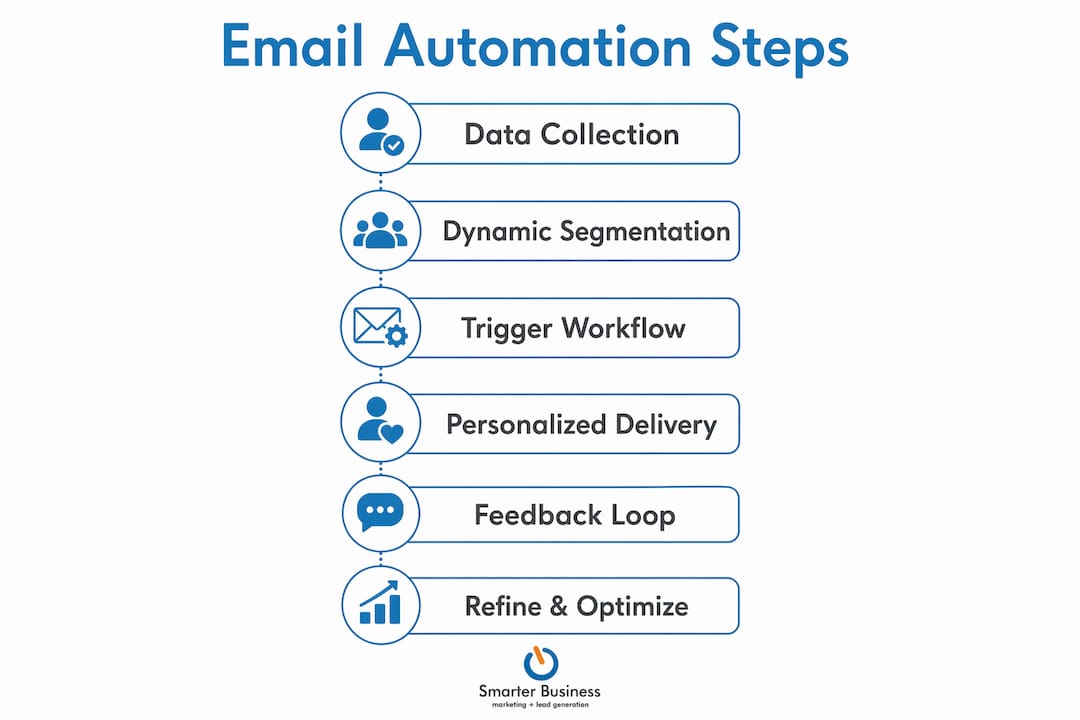
The process is more logical than it might first appear. Picture a conveyor belt: data goes in one end, personalised emails come out the other, and the results loop back to improve the next run.

Stage 1: Data collection. Your CRM gathers information from every touchpoint, including web forms, purchases, support tickets, and sales calls. The richer this data, the more targeted your emails can be.
Stage 2: Dynamic segmentation. Using CRM fields, you create segments that update automatically. Instead of manually exporting a list of “customers who bought in the last 30 days,” you define the rule once and the segment stays current in real time.
Stage 3: Triggered workflows. When a contact meets a condition, the workflow fires. These triggers fall into two types:
| Trigger type | How it works | Example |
|---|---|---|
| Behavioural | Fires based on a contact’s action | Clicks a pricing page link → enters lead nurture sequence |
| Timer-based | Fires after a set time period | — |
| CRM data change | Fires when a field value changes | Deal moves to “Closed Won” → onboarding welcome series starts |
| Date-based | Fires on or near a specific date | Subscription renewal 30 days away → renewal reminder sent |
Stage 4: Personalised email delivery. Each email pulls CRM field values into personalisation tokens, so the contact’s name, company, last purchase, or account manager appears naturally in the message.
Stage 5: The feedback loop. This is the step most businesses skip, and it is the one that separates real CRM email marketing from email-with-a-spreadsheet. Two-way synchronisation means that opens, clicks, replies, and unsubscribes flow back into the CRM record. Lead scores update. Sales reps see who is engaged. Future campaigns benefit from accumulated behavioural data.
Behavioural automation goes further still. Rather than running on timers alone, it pauses or changes workflows based on what a customer actually does. If a support ticket is open, intelligent automation holds the marketing sequence so you are not cheerfully upselling someone who is currently frustrated with your service.
Effective strategies for deploying email automation
Knowing the mechanics is one thing. Knowing where to start is another. Here are the strategies that deliver the fastest results for SMEs.
Start with your highest-impact workflows. A welcome series or post-purchase follow-up is the most effective entry point for businesses new to automation. These flows are relatively simple to build, have high engagement rates, and give you immediate data on what works. Build one end-to-end before adding anything fancier.
Use meaningful segmentation. For most SMEs, 3–7 dynamic segments is the right number. Think: new subscribers, active customers, lapsed customers, high-value buyers, and one or two behaviour-based cuts. The goal is segments that genuinely change what you send, not segments that exist because your tool can technically create them.

Build behavioural pauses into your workflows. If a contact books a call or raises a support ticket, the marketing sequence should pause automatically. Sending a promotional email to someone mid-complaint is the kind of thing that ends relationships.
Maintain list hygiene. Poor data quality undermines even the most sophisticated automation. Deduplicate contacts, validate email addresses, and archive truly inactive records before you build anything. Automation amplifies both good and bad data, so clean data is not a nice preparatory step; it is the foundation.
Measure CRM outcomes, not just open rates. Open rates tell you whether your subject line worked. They do not tell you whether your business grew. Track new opportunities created, deals progressed, and revenue generated as a direct result of your campaigns. That is the number that justifies the investment.
Integrate with other channels. Email works best as part of a broader outreach strategy. Connect your CRM automation to SMS, social media retargeting, and paid audiences so that a contact who does not open your email might still see your message on LinkedIn or receive a text about a time-sensitive offer.
Choosing the right email automation tool for your SME
The best tool is the one that fits your business model, your data quality, and your team’s capacity. Buying the most feature-rich platform on the market and then using 10% of it is a waste of everyone’s time and budget.
Four variables should drive your decision:
- B2B vs B2C: B2B businesses with a real sales pipeline need tight CRM integration and lead scoring. B2C or ecommerce businesses need purchase-history triggers and lifecycle flows.
- Sales motion maturity: If your sales process is informal or thin, a complex CRM-email integration will decay quickly. Start simpler and build up.
- Data cleanliness: Messy contact data makes personalisation worse than no personalisation at all. Sort the data before choosing the tool.
- Team capacity: An all-in-one platform that your team actually uses beats a best-in-class stack that nobody maintains.
Act! CRM sits in a particularly useful spot for sales-led SMEs. It handles contact management, pipeline tracking, and email automation natively, which means the data model is the same across all three functions. There is no syncing between separate tools, no field-mapping headaches, and no wondering whether your CRM and email platform are telling the same story. For businesses that want CRM training alongside implementation, that kind of integrated setup is far easier to learn and maintain.
Native integration always beats a bolted-on API connection. When CRM and email live in the same system, segments update in real time, personalisation tokens pull live field values, and the feedback loop closes automatically. When they are separate tools connected via a third-party integration, every one of those steps introduces a potential point of failure.
Pro Tip: Before evaluating any platform, write down the three workflows you actually need to run in the next 90 days. Then test whether each tool can build those specific workflows without custom development. Feature lists are marketing; your three workflows are reality.
Advanced CRM email automation insights from the consultancy floor
After years of helping SMEs implement Act! CRM and email automation, the patterns that separate successful projects from expensive disappointments are remarkably consistent.
Clean the data first, without exception. Personalisation built on duplicates and bad data is worse than no personalisation. A contact who receives an email addressed to “Dear [First Name]” or referencing the wrong product is less likely to engage than if they had received a plain, generic message. Data cleansing is unglamorous, but it is the single most valuable thing you can do before building any workflow.
Close the loop back to the CRM. Most teams build the outbound automation and then stop. Skipping two-way integration leaves your sales team blind to prospect interest. They cannot see who opened the last three emails, who clicked the pricing page link, or who is actively re-engaging after six months of silence. That information is gold for prioritising outreach, and it disappears entirely if engagement data does not flow back into the CRM.
Favour behavioural triggers over timer-only sequences. A sequence that fires every three days regardless of what the contact does is a blunt instrument. Behavioural automation that adjusts based on actions, including pausing when a support ticket is open or accelerating when a contact visits the pricing page twice in a week, produces a far better customer experience and better results.
Keep segmentation pragmatic. Effective segmentation is about defining high-impact groups that genuinely change your messaging, not about demonstrating technical capability. Three well-defined segments that actually alter what you send will outperform fifteen micro-segments that nobody maintains.
Test with a small batch before scaling. Build your workflow, then run it against a small test segment before releasing it to your full list. Check that personalisation tokens pull correctly, that conditional logic branches as expected, and that the timing feels right. A broken welcome sequence sent to 5,000 contacts is a much harder problem to fix than one sent to 50.
The integration sequence that consistently delivers results follows a precise order: clean contact data thoroughly, define your segments, map CRM fields to the email platform, build the trigger workflows, and then close the loop back to the CRM. Skip any step and the whole system underperforms.
Step-by-step setup for automating email campaigns in your CRM
Here is a practical sequence you can follow regardless of which CRM platform you use.
Step 1: Audit and clean your contact data
Before touching any automation settings, deduplicate your contacts, validate email addresses, and confirm that lifecycle stage fields (lead, customer, lapsed) are populated consistently. This is the foundation. Everything built on top of messy data will produce messy results.
Step 2: Define your segments
Decide which groups genuinely need different messages. New subscribers, active customers, lapsed contacts, and high-value buyers are a solid starting point. Create dynamic segment rules in your CRM so these lists update automatically as contact data changes.
Step 3: Map CRM fields to your email platform
Identify which CRM fields will drive personalisation and segmentation in your emails: lifecycle stage, last purchase date, account owner, lead score, and any custom fields relevant to your business. Test the field mapping with a small batch before running it across your full contact list.
Step 4: Build your first trigger workflow
Start with one workflow, not twenty. A welcome series for new subscribers or a post-purchase follow-up for new customers is the right starting point. Map the sequence on paper first: trigger, email 1, delay, email 2, conditional branch, exit criteria. Then build it in your CRM’s workflow editor.
A typical welcome series structure looks like this:
- Day 0: Welcome email, delivered immediately on sign-up.
- Day 1: Value-led content introducing your key offering.
- Day 3: Case study or social proof relevant to their industry.
- Day 7: Soft call to action, such as booking a call or starting a trial.
- Day 14: Follow-up for non-converters with an alternative offer.
Step 5: Add conditional logic
Make the workflow respond to what contacts actually do. If someone clicks the “book a call” link in Day 3, they should exit the nurture sequence and enter a sales-handoff workflow instead. If they open every email but never click, a different message at Day 14 might shift the dynamic. Conditional branching is what turns a timer-based drip into genuine behavioural automation.
Step 6: Close the loop back to the CRM
Configure your email platform to write engagement data back to each contact’s CRM record. Opens, clicks, replies, and unsubscribes should all appear on the contact timeline. This keeps lead scores current and gives your sales team a live view of prospect interest. For a detailed walkthrough of this integration step, Smarterbusiness has a practical guide on CRM integration setup that covers field mapping and sync configuration specifically for SMEs.
Step 7: Monitor, test, and refine
Automation is not a set-and-forget exercise. Review workflow performance monthly. Look at which emails in a sequence see a sharp drop in engagement, because that is usually where the message or timing needs adjusting. Track CRM outcomes, such as new opportunities created and deals progressed, not just open rates. Those are the numbers that tell you whether the automation is actually working.
For SMEs using Act! CRM, Smarterbusiness offers lead nurturing guidance specifically designed around building and refining these kinds of workflows within the platform.
Ready to automate your email campaigns properly?

Smarterbusiness is a certified Act! CRM consultancy that has been helping SMEs across Ireland and the UK build practical, effective CRM and email automation systems since 2014. The approach is consultancy first, software second: every setup is tailored to how your business actually works, not how the software manual says it should work.
Whether you are starting from scratch or untangling an existing setup that never quite delivered, Act! CRM training from Smarterbusiness gives your team the skills and the system to make automation work in the real world.
Key takeaways
Automating email campaigns with a CRM works when clean data, meaningful segments, and a closed feedback loop are all in place before a single workflow goes live.
| Point | Details |
|---|---|
| Lifecycle flows drive outsized revenue | Automated lifecycle emails generate 41% of total email revenue from just 5.3% of all email sends. |
| Clean data comes first | Deduplicate and validate contacts before building any workflow; bad data makes personalisation worse, not better. |
| Close the feedback loop | Email engagement must flow back into the CRM so sales teams can see prospect interest and lead scores stay current. |
| Start with one workflow | A welcome series or post-purchase follow-up is the highest-impact starting point for SMEs new to automation. |
| Measure CRM outcomes | Track new opportunities and deals progressed, not just open rates, to assess whether automation is driving real growth. |