You have 0 items in your cart

No CRM is “GDPR compliant” straight out of the box, any more than a filing cabinet is. Compliance is about how you use the system: what you collect, why you hold it, who can see it, how long it stays and how fast you can act when someone asks about their data. A well-configured CRM makes all of that easier. A badly configured one is a spreadsheet with better branding.
This guide walks Irish SMEs through what the rules ask for and how to set up a CRM, including Act! CRM, so the answers are at your fingertips rather than hidden in someone’s inbox.
TL;DR
- GDPR compliance lives in your processes. The CRM is the tool that lets you prove them.
- Record a lawful basis for every group of contacts, and the source and date of any consent.
- Marketing emails need clear consent, with a few narrow exceptions for existing customers, and every message needs an opt-out.
- Limit who can see what, set retention rules, and know your 72-hour breach reporting window.
- Configure the CRM around your workflows first, then train the team to use it that way.
Table of Contents
- What counts as personal data in your CRM
- The seven principles, applied to a contact database
- Pick a lawful basis for every contact group
- Email marketing: consent, exceptions and opt-outs
- Security, access and retention: the unglamorous bit
- Setting up Act! CRM with GDPR in mind
- When something goes wrong: breach basics
- Our perspective: compliance is a workflow problem
- Getting help configuring your CRM
- FAQ
- Sources
What counts as personal data in your CRM
More than you might think. The Data Protection Commission (DPC) explains that personal data is any information about an identified or identifiable living person, such as a name, email address, phone number, address or location data. Special-category data gets extra protection and is generally prohibited unless specific conditions are met.
In a CRM that means:
- Contact records: names, job titles, direct emails, mobile numbers.
- Notes: that free-text box where someone types “off sick, back after surgery” is a health data problem waiting to happen.
- Email history, call logs and meeting notes tied to a person.
- Form and survey responses linked to a contact.
Business contacts are covered too. A sole trader’s email or a named person at a company is still personal data. Only fully anonymous or purely corporate information (info@ addresses, for instance) sits outside it.
The seven principles, applied to a contact database
The European Commission lists seven principles: lawfulness, fairness and transparency; purpose limitation; data minimisation; accuracy; storage limitation; integrity and confidentiality; and accountability. Accountability means you comply and can demonstrate it when asked.
Here is what each looks like when you open your CRM on a Monday morning.
| Principle | What it means in the CRM |
|---|---|
| Lawfulness, fairness, transparency | Each contact has a recorded lawful basis and has been told what you do with their data |
| Purpose limitation | Data collected for a quote is not quietly used for a newsletter |
| Data minimisation | Fields exist only if you genuinely need them |
| Accuracy | Duplicates are merged and bounced emails are flagged |
| Storage limitation | Old records are reviewed, anonymised or deleted on a schedule |
| Integrity and confidentiality | Permissions, strong logins, backups |
| Accountability | A trail showing who changed what, and when consent was given |
The minimisation row is where most SMEs trip first. If a field has sat empty for two years, it is clutter, and clutter is a liability.
Pick a lawful basis for every contact group
You need one of six lawful bases to process personal data, as the European Commission sets out: consent, contractual necessity, legal obligation, vital interests, a public-interest task, or legitimate interests where individuals’ rights are not seriously impacted.
For most SMEs the everyday split looks like this:
- Customers you are serving: contract. You need their details to deliver and invoice.
- Newsletter subscribers: consent.
- Cold business enquiries you follow up on: often legitimate interests, but only if you can explain the balancing test in writing.
Build a “lawful basis” drop-down field in your CRM and make it mandatory on new records. It takes ten minutes to set up and saves a headache at audit time. If you want a deeper look at the consent side, our guide to consent management in CRM covers the four controls Irish SMEs need.
Email marketing: consent, exceptions and opt-outs
This is where CRMs and the law meet most often. According to the DPC, direct electronic marketing generally requires prior consent: a clear, affirmative act that is freely given, specific, informed and unambiguous. Pre-ticked boxes and silence do not count.
There is a limited carve-out. Under the DPC’s guidance, existing customers may be marketed your own similar products if they were given a chance to object when their details were collected and in every message, with the first message sent within 12 months of the sale. Every marketing communication needs a way to opt out.
And when someone does object, it is not enough to stop sending. The DPC says individuals can object to direct marketing at any time, and you must stop using their data for that purpose, including deleting it from marketing databases.
What to build into the CRM:
- A consent status field (given, withdrawn, none) plus the date and source, such as “web form, 14 March”.
- A marketing-eligibility flag that your email tool reads, so unsubscribes sync back automatically.
- A rule that opted-out contacts are excluded from every mailing list, not just the one they clicked from.
If you are building out the campaign side, this step-by-step email marketing guide is a handy companion, and our own walkthrough on automating email campaigns with a CRM shows how the pieces connect.
Security, access and retention: the unglamorous bit
Leaving every salesperson with full access to every record is the data protection equivalent of leaving the shop keys under the mat. Aim for these controls:
- Role-based permissions. Sales see their own accounts, finance sees billing, nobody sees what they do not need.
- Strong, unique logins and removal of leavers the same day.
- Sensible field design. Keep sensitive details out of free-text notes.
- A retention rule. Decide how long inactive prospects and former customers stay, write it down and diarise a review.
- A way to answer data subject requests. If someone asks what you hold on them, you should be able to search by name and export everything in minutes, not days.
Passwords deserve a mention. In a 2024 decision the DPC found that plaintext passwords accessible to employees were an unauthorised disclosure and a personal data breach. The lesson for an SME is simple: never store credentials in CRM notes or custom fields.
Setting up Act! CRM with GDPR in mind
Act! is flexible enough to model all of the above, but flexibility cuts both ways. Left on defaults, it will happily store whatever anyone types. A sensible configuration usually includes:
- Custom fields for lawful basis, consent status, consent date and consent source.
- Security roles that match your job roles, rather than one shared admin login.
- Saved lookups, for example “no activity in 36 months” or “marketing consent withdrawn”, so reviews take a click.
- Connected forms, surveys and chat tools mapped so each submission writes consent details onto the contact record.
- Reports and dashboards that show consent coverage and data quality at a glance.
For more complex needs, custom tables let you keep a consent history log rather than overwriting one field. Custom Tables cost €9 per month per user.
If you are moving data in from spreadsheets, clean it first. Importing old, undocumented lists into a shiny new system just moves the mess. Our piece on consultancy-led CRM data migration explains how to avoid that, and the five-step onboarding plan with GDPR checks puts the sequence in order.
When something goes wrong: breach basics
Breaches happen to careful businesses too: a laptop left on a train, an email sent to the wrong list. The DPC’s guidance says you must document every breach and notify the DPC without undue delay, and where feasible within 72 hours, if the breach may pose a risk to individuals. The clock starts when you have a reasonable degree of certainty that a security incident has compromised personal data.
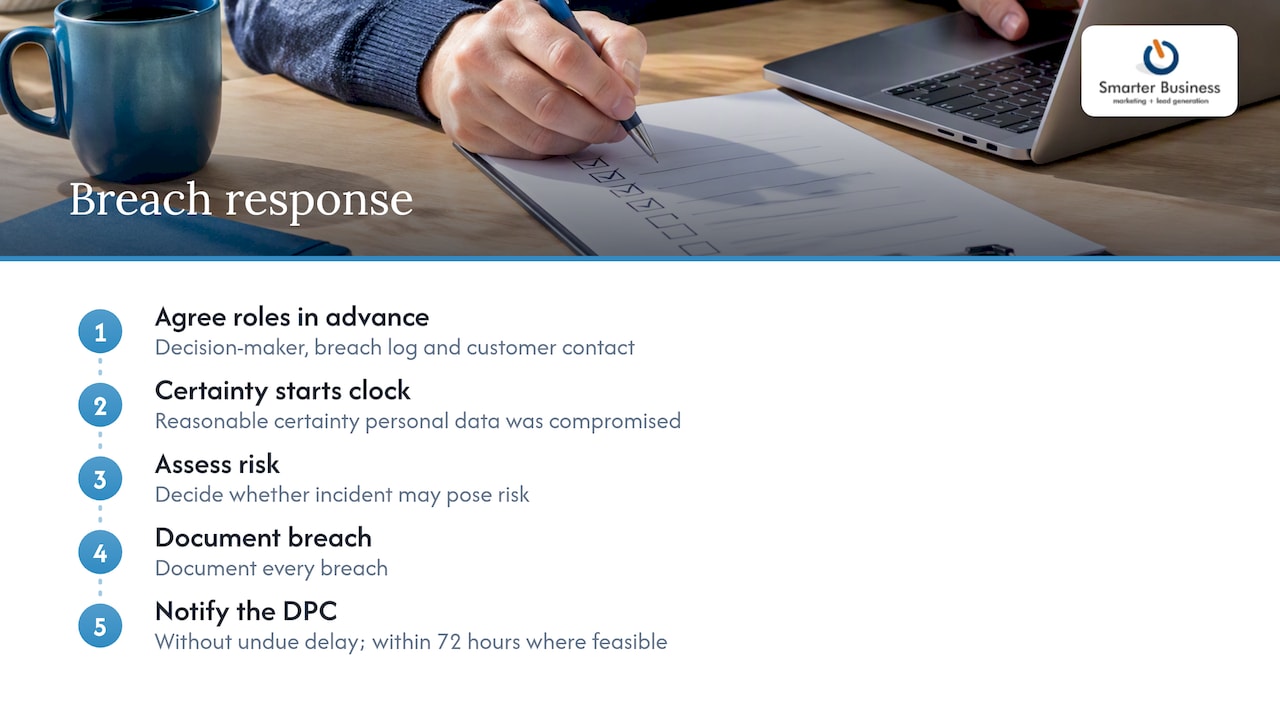
Practically, that means agreeing in advance who decides whether an incident is reportable, where the breach log lives, and who contacts affected customers. A one-page plan beats a perfect plan nobody has read.
Our perspective: compliance is a workflow problem
We have spent more than a decade in Irish SME offices, and the pattern is always the same. Nobody sets out to break the rules. Data protection slips because the process is vague: three copies of the customer list, a salesperson who “just keeps contacts on their phone”, a mailing list nobody can trace back to a sign-up.
So we start with how your business actually runs, then shape the CRM around your terminology, permissions and reports. Compliance then becomes part of the daily routine rather than a once-a-year panic. When the consent date is a field on the record and the retention review is a saved search, doing the right thing is also the easy thing.
One practical tip: do not try to fix everything at once. Get lawful basis and consent fields live first, then permissions, then retention.
— Patrick Lennon
Getting help configuring your CRM
If you would rather have this set up properly once than patched repeatedly, we are a certified Act! CRM consultancy and we tailor the system to your workflows, permissions and reporting, then train your team to use it. Our CRM training and services cover customisation, integrations, automation and dashboards. Act! Advantage plans start at €30 per month per user on the Act! Advantage pricing page.

FAQ
Is Act! CRM GDPR compliant?
The software gives you the tools to support compliance, but compliance depends on how you configure and use it. Fields for consent, role-based permissions and searchable records are what let you demonstrate it. We set these up around your processes.
Do I need consent to email business contacts?
Often, yes. Direct electronic marketing generally needs consent, with a narrow exception for existing customers and similar products. Always include an opt-out, and check the DPC guidance before relying on the exception.
How long can I keep contact data in my CRM?
Only as long as you need it for the purpose you collected it. GDPR sets no single period, so you decide a reasonable retention rule, document it and review records against it regularly.
What should I do if a CRM data breach occurs?
Record the facts, assess the risk to individuals and, if there may be a risk, notify the DPC without undue delay and where feasible within 72 hours. Keep the breach log even when you decide not to report.
Sources
- What are “personal data” and when are they “processed”? (DPC)
- Principles of the GDPR (European Commission)
- Legal grounds for processing data (European Commission)
- Data Protection Basics (DPC)
- Electronic Direct Marketing FAQ (DPC)
- Meta decision summary (DPC)
- GDPR breach notification quick guide (DPC)
- Email marketing step by step for small business growth