You have 0 items in your cart

A successful CRM data migration moves every contact, deal, and note across intact, with relationships preserved and barely a ripple felt by your sales team. The single best first move isn’t picking new software. It’s writing a scoped migration plan and running a proper data audit before you touch a single export button.
TL;DR:
- Conduct a thorough data audit, including inventory, deduplication, standardization, and flagging outdated or orphaned records, before starting migration.
- Build a detailed field mapping sheet to handle picklist mismatches, splitting or merging fields, and preserving original record IDs for accurate relationship rebuilding.
- Test a representative sample of messy records through a pilot import to identify mapping gaps, validate relationships, and ensure data transfer completeness.
- Schedule cutover during quiet periods, run delta exports, manually reconcile totals, and establish rollback criteria before finalizing the migration.
- Recreate and test automations, integrations, and permissions in the new system, and implement change management strategies to promote adoption and reduce resistance.
Table of Contents
- What is CRM data migration and why does the checklist matter?
- Auditing and cleaning your data before you migrate
- Building a field mapping sheet that actually holds up
- Why a pilot import saves you from disaster
- Cutover day: the delta import and validation checklist
- Rebuilding automations, integrations and permissions
- Getting your team to actually use the new system
- Which migration route actually suits your dataset?
- What an SME CRM consultancy actually does on day one
- The uncomfortable truth about most migration failures
- How Smarterbusiness can run or support your migration
- Sources
What is CRM data migration and why does the checklist matter?
CRM data migration is the process of moving your customer records, sales history, activities and files from one system into another without losing the connections between them. Get it right, and your team logs in Monday morning to find everything exactly where it should be. Get it wrong, and you’re chasing orphaned notes and duplicate contacts for months.
Treat it as a project with a proper plan, not a weekend job for whoever’s free. Here’s the sequence that keeps a migration on the rails:
- Define objectives and success criteria. What does “done” look like? Zero duplicate records, every deal history intact, under two hours of downtime.
- Decide scope. List every object you’re moving: contacts, companies, opportunities, activities, custom fields, attachments, integrations.
- Assign roles and get sign-off. Someone owns data quality, someone owns the technical import, someone owns user communication. Get stakeholders to agree the plan before work starts.
- Set a phased timeline. Audit, pilot, cutover, validation, each with its own deadline and checkpoint.
Skip the plan and you’re essentially playing whack-a-mole with data problems for the next six months, fixing one issue only to find three more hiding behind it.
Auditing and cleaning your data before you migrate
Old CRM databases accumulate clutter the way garages accumulate boxes nobody’s opened in years. Before migrating a byte, work out what’s actually worth keeping.
Start with an inventory: how many contact records, companies, deals and activities exist, and how far back does the history go? Legacy migration guidance recommends sorting every record into one of three buckets: keep, clean, or archive, rather than dragging a decade of stale leads into your shiny new system by default.
Practical cleansing steps that make a genuine difference:
- Run a deduplication pass on contacts and companies using email and phone matching, not just name matching.
- Standardise formats: phone numbers, addresses, industry categories, and job titles that have drifted into ten different spellings.
- Flag records with no activity in the past two or three years for archiving rather than migration.
- Check for orphaned records, deals with no linked contact, or activities with no linked deal.
- Validate mandatory fields are actually populated before export, not after.
Pro Tip: Run your deduplication and standardisation pass on a copy of the data, never the live database. It gives you a safety net if a cleansing rule turns out to be too aggressive.
Building a field mapping sheet that actually holds up
A mapping sheet is the single most underrated document in any migration. Miss this step and you’re relying on memory to remember that “Lead Source” in your old system needs to become “Referral Channel” in the new one.
Build a spreadsheet with the source field, source ID, destination field, data type, and any transformation rule required. Microsoft’s own migration guidance stresses mapping, transforms and validation as the technical backbone of any safe CRM transfer, and it’s not hard to see why: this is where most silent data corruption happens.
Common edge cases worth mapping deliberately rather than hoping for the best:
- Picklists that don’t match. Your old “Status” field might have seven options; the new system has five. Decide the mapping before import, not during.
- Split and merge rules. A single “Full Name” field splitting into first and last name, or two address lines merging into one.
- Type mismatches. Date fields stored as text, currency fields stored as plain numbers.
- Source IDs preserved. Keep the original record ID in a mapping column so relationships between contacts, deals and activities can be rebuilt after import, an approach that Microsoft’s migration insights specifically flag as essential for reconciliation.
Why a pilot import saves you from disaster
Never migrate everything on the first attempt. A pilot import with a representative sample tells you exactly where your mapping sheet has gaps, long before those gaps become a live problem affecting the whole sales team.
Choose your test set deliberately:
- Include a handful of “awkward” records on purpose, duplicates, contacts linked to multiple companies, records with attachments. A stepwise migration process recommends testing with deliberately messy records rather than clean, easy ones, because clean records never reveal mapping problems.
- Validate record counts match between source and destination.
- Check that relationships survived: does each deal still link to the right contact and company?
- Confirm activities, notes and attachments transferred, not just the core record.
Industry guidance on migration failures consistently points to testing with representative records as one of the practices that separates smooth migrations from painful ones. If the pilot throws up issues, fix the mapping and run it again. Sign-off only happens once the pilot is clean.
Cutover day: the delta import and validation checklist
Cutover is where the plan either pays off or falls apart. Schedule it for a quiet window, ideally a weekend or evening, and freeze edits in the source system if you possibly can. Nothing derails a migration faster than someone updating a deal in the old system an hour before you export.
- Run the final delta export, capturing everything created or changed since your last pull.
- Import the delta and reconcile totals object by object: contacts in, contacts out, deals in, deals out.
- Spot check a sample of records manually rather than trusting counts alone.
- Retain the original exports and a written record of what was migrated, when, and by whom.
- Agree your rollback criteria before cutover starts, not after something’s gone wrong.
A proven process across successful switches follows exactly this pattern: export, clean, map, pilot, then a final delta import at the moment of cutover.
Rebuilding automations, integrations and permissions
The data landing safely is only half the job. Workflows, permission structures and connected tools all need rebuilding, and this is the stage most SMEs underestimate.
- Inventory every automation, integration, shared inbox and scheduled job running in the old system before you switch it off.
- Recreate teams and permission structures before anyone touches the new system, not after.
- Test triggers and integrations in a sandbox first, then again once live.
- Prioritise business-critical items, invoicing triggers, lead routing, and document what’s deliberately left for phase two.
Attachments, activity histories and custom objects are the items most commonly left behind in a migration unless specifically exported and validated as a separate step. A CRM data model built with custom structures in mind from the outset makes this rebuild considerably less painful.
Getting your team to actually use the new system
The best migration in the world means nothing if your sales team quietly keeps a spreadsheet on the side because they never trusted the new system. Change management isn’t a nice-to-have bolted onto the end. It’s the difference between a technical success and a business one.
- Deliver role-based training: what a sales rep needs is different from what a finance manager needs.
- Roll out to a pilot group first, gather feedback, then expand organisation-wide.
- Define support response times and a clear escalation point for the first few weeks.
- Track three or four adoption KPIs, logins per week, records updated, deals logged, and adjust training where the numbers dip.
Pro Tip: Ask your pilot group to keep using the old system’s terminology for the first fortnight if the new CRM has renamed fields. Fighting two changes at once, new software and new vocabulary, is where adoption usually stalls.
Treating migration as a business transformation rather than a technical event is consistently what separates the CRM rollouts that stick from the ones that quietly die within six months.
Which migration route actually suits your dataset?
There’s no single correct method, only the right method for your data’s size and complexity.
- Native importers suit small, clean datasets with standard fields. Fast and cheap, but limited when custom objects or complex relationships are involved.
- ETL tools and connectors handle mid-sized datasets with some custom structure. More flexible than native import, though they demand mapping expertise.
- API-based scripts suit large or highly customised datasets. Maximum control, but they need technical resource to build and test properly.
- Managed migration services suit businesses that want the risk carried by someone with the scars to prove they’ve done it before.
Five distinct methods, each with a different balance of speed, flexibility and cost, and matching the method to your dataset matters more than chasing the flashiest tool on the market.
What an SME CRM consultancy actually does on day one
A CRM consultancy has run CRM migrations for Irish SMEs since 2014, built by a founder with decades in sales and operations rather than pure software deployment.
Day one of a typical engagement starts with the same audit outlined above: object inventory, data quality check, stakeholder sign-off on scope. What differs is the depth of the mapping exercise, because The consultancy tailors field structures, terminology and permissions to how the business actually runs, not a generic template. A migration scoped this way expects a working pilot within the first fortnight and a cutover plan with a defined rollback point, so nothing moves live until it’s proven clean.
The uncomfortable truth about most migration failures
The technical part of a migration is rarely what goes wrong. Field mapping and export formats are solvable problems with enough care. What actually derails migrations is treating them as an IT ticket instead of a business change, skipping stakeholder sign-off, rushing the audit, and assuming training is a half-day session bolted on at the end.
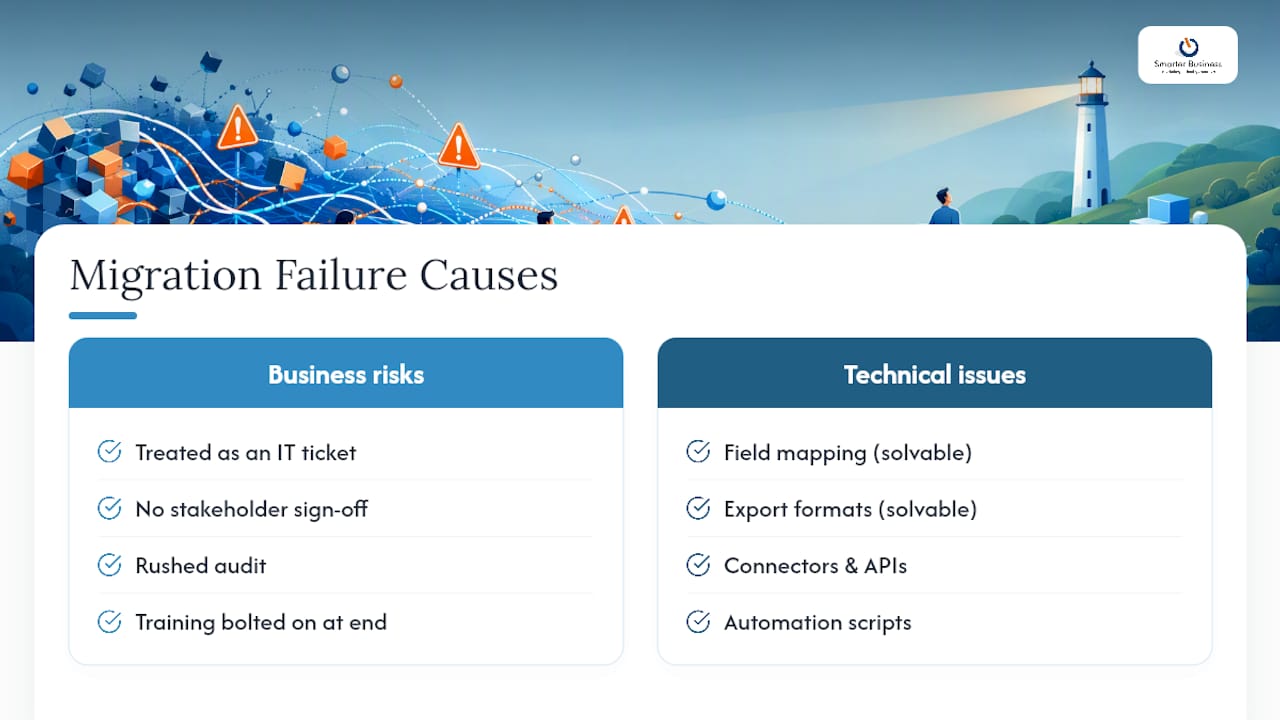
Conventional advice leans heavily on tooling: pick the right connector, get the API right, automate the export. That’s necessary but insufficient. The migrations that go badly wrong almost always trace back to a scope decision nobody agreed on, or a pilot that got skipped because “the data’s not that complicated.” It always is, once you look properly.
If you’re planning a migration, prioritise the audit and the stakeholder sign-off before you even think about tools. A clean, well-mapped dataset moved through a basic native importer beats a messy dataset moved through the most sophisticated API script money can buy. Data quality is the leverage point, not the software.
— Patrick Lennon
How Smarterbusiness can run or support your migration
This service is the alternative to a DIY spreadsheet-and-hope approach to CRM data migration, built specifically for Irish SMEs who want the risk of getting it wrong carried by experienced consultants.

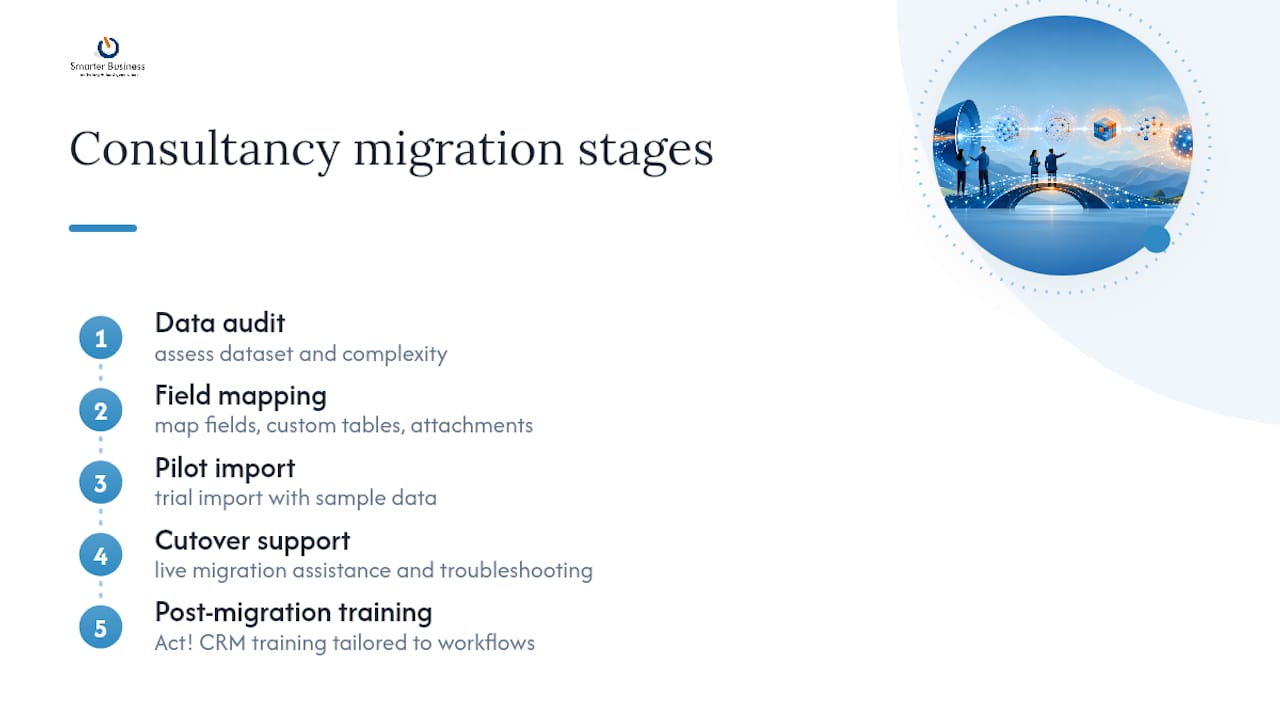
A typical engagement covers the full sequence above: data audit, field mapping, pilot import, cutover support, and post-migration training, delivered by an experienced CRM consultancy rather than a generic software reseller. That includes Act! CRM training tailored to your team’s actual workflows, not a canned course, alongside database services for custom tables and attachments that standard importers tend to drop. Pricing for consultancy work is quoted in euros and scoped to the size of your dataset and the complexity of your workflows; please contact for current rates.
If your migration involves custom fields, multiple integrations, or a sales team that’s already nervous about change, get in touch for an initial consultation and a scoped quote before you set a cutover date.
Sources
For deeper technical detail alongside this checklist, Microsoft’s Dataverse migration documentation covers mapping and sandbox testing in more depth. The Power Platform migration repository on GitHub offers technical examples for teams building custom scripts. Community threads on the Dynamics 365 forum cover practical prerequisites and export caveats worth checking before you start.
- CRM data migration to Dataverse: Key insights and best practices
- Legacy CRM Data Migration: What to Keep, Clean, or Archive?