You have 0 items in your cart

Customer lifecycle management (CLM) is defined as the practice of tracking, analysing, and responding to every stage a customer passes through, from first hearing about your business to becoming a loyal advocate. When paired with a well-configured CRM system, CLM gives SMEs the kind of visibility that was once reserved for large enterprises with dedicated marketing teams. This customer lifecycle management CRM guide covers the five core lifecycle stages, how to build journey maps from real behavioural data, and which CRM practices actually move the needle on retention and revenue. Smarterbusiness has been helping Irish SMEs put this into practice since 2014, and the patterns we see are consistent: businesses that manage the lifecycle deliberately grow faster and lose fewer customers.
What are the stages of the customer lifecycle and how do they relate to CRM?
Five lifecycle stages form the backbone of any CLM strategy: awareness, consideration, decision, onboarding, and advocacy. Each stage has its own customer behaviours, and your CRM should capture a distinct set of data points at every one of them.
| Stage | Key customer actions | CRM data sources |
|---|---|---|
| Awareness | Website visits, ad clicks, social engagement | Page visit logs, UTM parameters, lead source fields |
| Consideration | Email opens, content downloads, webinar sign-ups | Email engagement data, form submissions |
| Decision | Quote requests, demo bookings, sales calls | Sales activity logs, pipeline stage timestamps |
| Onboarding | Product activation, support tickets, check-in responses | Onboarding task completion, support logs |
| Advocacy | Referrals, reviews, repeat purchases | Referral tracking, purchase history, NPS scores |

The CRM is not just a filing cabinet for this data. It is the engine that connects each stage to the next. A prospect who downloads a pricing guide moves from consideration to decision. Your CRM should flag that shift and trigger the right follow-up automatically, not leave it to chance or memory.
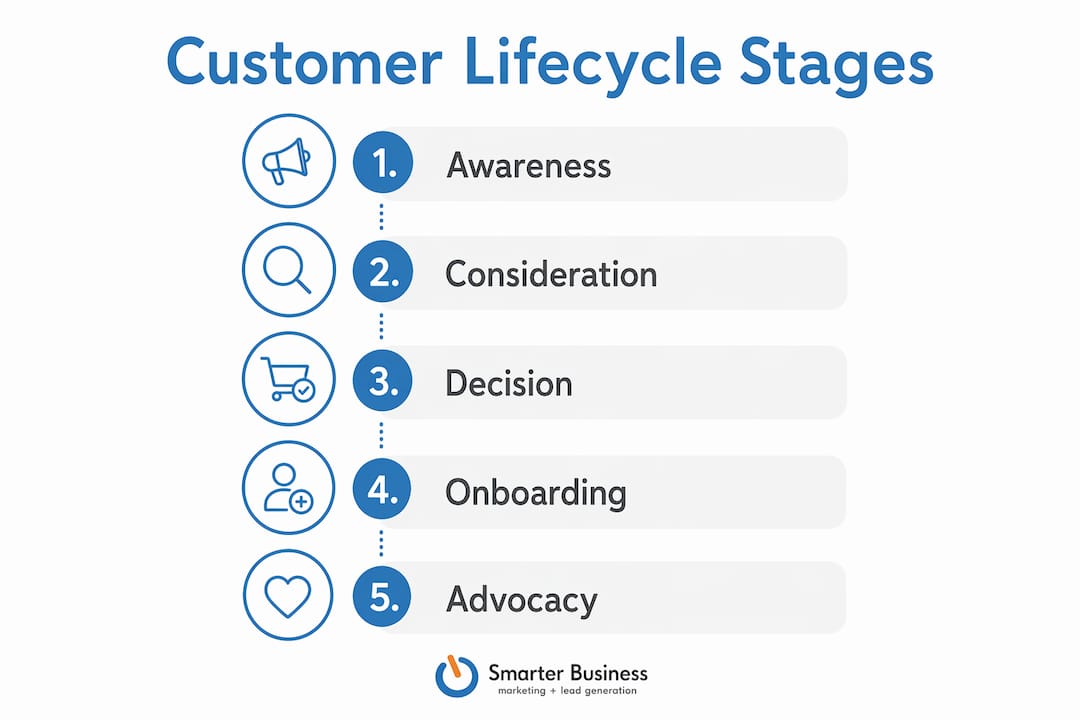
Lifecycle marketing works because it meets customers where they actually are, rather than blasting the same message to everyone. A new lead does not need a loyalty discount. A long-standing client does not need an introductory welcome email. Matching the message to the stage is the whole game.
Pro Tip: Set up a custom lifecycle stage field in your CRM and update it based on defined criteria, not gut feeling. This single field will make your reports, your automations, and your team’s daily decisions dramatically clearer.
How can SMEs build accurate customer journey maps using CRM data?
Most managers assume the customer journey is a tidy, linear path. Real CRM data tells a messier story, with drop-offs, loops, and detours that no whiteboard session would ever predict. Accurate journey mapping is a data engineering challenge, not a design exercise.
The good news is that your CRM already holds most of what you need. The key is knowing which fields to trust and which to ignore. About 30 high-impact data fields covering identity, intent, and revenue timing give you a clean, workable map. Piling in 200 fields creates dirty data and broken automations.
Here is a straightforward process for building a basic journey map from CRM data:
- Export your closed-won and closed-lost records for the past 12 months. These are your ground truth.
- Identify the key timestamps at each lifecycle stage: first contact date, first meeting date, proposal date, close date.
- Map the average time between stages to find where deals stall or customers disengage.
- Cross-reference with engagement data such as email opens, page visits, and support tickets to spot behavioural patterns.
- Highlight the friction points where a significant number of customers dropped off or went quiet.
- Build your automation triggers around those friction points, not around arbitrary calendar intervals.
The field-first approach is worth repeating. Resist the urge to track everything. A lean, clean data set beats a bloated one every time, because your automations will actually fire correctly.
Pro Tip: Run a data audit before you build your journey map. If a field has more than 20% blank or inconsistent entries, either fix it or drop it from your map entirely.
What are trigger-based workflows and how do they improve CRM automation?
Trigger-based workflows are automated CRM actions that fire when a specific customer behaviour occurs, rather than on a fixed schedule. Think of batch marketing as watering every plant in your garden on a Tuesday regardless of whether they need it. Trigger-based marketing waters the plant the moment the soil goes dry.
Triggered campaigns achieve 4–8 times higher engagement than traditional batch marketing. That gap exists because triggered messages are timely and relevant, two things batch emails almost never are simultaneously.
Practical trigger examples across the lifecycle include:
- Awareness to consideration: A prospect visits your pricing page twice in one week. Trigger a personalised follow-up email from their assigned sales contact.
- Decision stage: A proposal has been open for five days with no response. Trigger a check-in task for the sales rep.
- Onboarding: A new client has not logged in or responded to their welcome email within 72 hours. Trigger an onboarding reminder sequence.
- Churn risk: A previously active customer has had no engagement for 60 days. Trigger a re-engagement campaign or a personal call alert.
- Advocacy: A customer completes their third purchase. Trigger a referral programme invitation.
The CRM integration with marketing automation is what makes this possible at scale. Without that connection, you are back to playing whack-a-mole with a spreadsheet and a prayer.
Best practices for trigger-based automation:
- Define a clear trigger condition before building any workflow.
- Set a suppression rule so customers do not receive the same trigger twice in a short window.
- Review trigger performance monthly and retire any workflow with low engagement.
- Keep triggered emails short. One clear message, one clear next step.
What are effective CRM customer management strategies for SMEs?
Effective customer management starts with segmentation by value, behaviour, and growth potential. Not every customer deserves the same level of attention, and pretending otherwise wastes time and money. A CRM lets you sort your contacts by purchase frequency, deal size, industry, or engagement level, and then act on each segment differently.
Personalisation follows naturally from good segmentation. A customer who buys quarterly gets a different communication rhythm than one who bought once two years ago. Your CRM holds the data to make that distinction automatic rather than manual.
Proactive management is where most SMEs fall short. Waiting for a customer to complain before acting is like noticing the engine warning light only after the car has stopped. Satisfaction metrics such as NPS, CSAT, and CES give you early warning signals. Pair those with CRM retention data and you can intervene before a customer quietly walks out the door.
Key CRM practices that improve lifecycle outcomes:
- Score your contacts by engagement level and update scores automatically based on CRM activity.
- Set up a churn risk flag that triggers when a customer’s engagement drops below a defined threshold.
- Use survey tools integrated with your CRM to collect NPS data at key lifecycle moments.
- Track retention rate and customer lifetime value as your primary commercial metrics, not just new leads generated.
- Review your top 20% of customers quarterly and assign proactive outreach tasks in your CRM.
Key takeaways
Effective customer lifecycle management requires clean CRM data, stage-specific automation, and proactive monitoring of retention metrics to turn one-time buyers into long-term advocates.
| Point | Details |
|---|---|
| Five lifecycle stages | Awareness, consideration, decision, onboarding, and advocacy each need distinct CRM data and responses. |
| Data-driven journey mapping | Use real CRM behavioural data, not assumptions, to identify where customers drop off. |
| Trigger-based automation | Triggered workflows achieve 4–8 times higher engagement than batch marketing campaigns. |
| Segmentation and personalisation | Segment by value, behaviour, and potential to deliver relevant messages at the right time. |
| Retention metrics matter | Track retention rate and customer lifetime value as your core CRM success indicators. |
What I have learned from years of CLM implementation in SMEs
Patrick Lennon, founder of Smarterbusiness, shares his perspective:
The single biggest mistake I see SMEs make is treating their CRM as a glorified address book. They capture contact details, log a few calls, and then wonder why the system is not delivering any insight. The data is there. The problem is that nobody decided upfront which fields actually matter.
When we work with a new client, the first conversation is never about software. It is about their process. Where do leads come from? What happens between the first meeting and the signed contract? Where do customers go quiet? Those questions reveal the lifecycle map, and the CRM simply needs to be configured to reflect it.
The B2B reality is striking. 57% of the buyer journey is complete before a prospect ever speaks to sales. That means your CRM needs to be working hard long before a human picks up the phone. Automation is not a luxury for SMEs. It is the only way to stay present across a journey you are largely not invited to.
My honest advice: start with onboarding and retention. New customers are expensive to acquire and easy to lose through neglect. Get those two lifecycle stages right in your CRM before you worry about anything else. The revenue impact is immediate and measurable.
— Patrick Lennon
How Smarterbusiness helps SMEs get CRM and lifecycle management right
Smarterbusiness works with SMEs across Ireland to configure CRM systems that actually reflect how their businesses operate, not how a software vendor imagines they do. As a certified Act! CRM consultancy, Smarterbusiness tailors every system to match your workflows, your terminology, and your lifecycle stages.
Whether you need a full CRM consultancy engagement to map your customer journey and build your automations, or you want to get more from a system you already have, Smarterbusiness brings the operational experience to make it practical. The team also offers Act! CRM training to ensure your team actually uses the system rather than working around it. A well-configured CRM is only as good as the people using it confidently every day.
FAQ
What is customer lifecycle management in CRM?
Customer lifecycle management (CLM) is the practice of tracking and responding to each stage a customer passes through, from awareness to advocacy, using CRM data to guide communications and decisions.
How many stages are in the customer lifecycle?
The five standard lifecycle stages are awareness, consideration, decision, onboarding, and advocacy. Each stage requires different CRM data and different marketing responses.
Why do trigger-based workflows outperform batch marketing?
Triggered campaigns fire based on actual customer behaviour, making them timely and relevant. Research shows they achieve 4–8 times higher engagement than batch marketing sent on a fixed schedule.
How many CRM data fields do I need for journey mapping?
Around 30 high-impact fields covering identity, intent, and revenue timing are sufficient for an effective journey map. More fields create data quality problems that break automations.
What metrics should SMEs use to measure CRM success?
Retention rate and customer lifetime value are the primary commercial metrics. Satisfaction indicators such as NPS, CSAT, and CES provide early warning signals for churn risk.