You have 0 items in your cart

You’re running a small business, juggling a dozen conversations with prospects, following up on quotes, and trying to remember who asked for a callback on Thursday. Sound familiar? Understanding why small businesses need CRM becomes crystal clear the moment a hot lead goes cold because it fell through the cracks of a spreadsheet. Here’s the surprising part: CRM adoption among micro-businesses sits at only around 50%, yet the businesses that do invest see an average ROI of over 300% within three years. That gap is a massive opportunity.
Table of Contents
- Key Takeaways
- Why small businesses struggle without CRM
- The real ROI of CRM for small businesses
- CRM adoption pitfalls and how to dodge them
- Comparing CRM options for small companies
- How to implement CRM successfully
- My honest take on why CRM fails small businesses
- Let Smarterbusiness set you up for CRM success
- FAQ
Key Takeaways
| Point | Details |
|---|---|
| Adoption gap is real | Only about 50% of micro-businesses use CRM, leaving enormous efficiency gains on the table. |
| ROI arrives fast | Small businesses average 303% ROI over three years with a payback period of roughly six months. |
| Data decay kills revenue | Contact information decays roughly 30% annually, making clean, centralized data a non-negotiable priority. |
| Adoption beats features | Poor user adoption causes 43% of CRM failures. Picking a simpler system your team will actually use beats a feature-heavy one nobody touches. |
| Implementation strategy matters | A phased rollout increases success rates nearly 3x compared to a big-bang approach. |
Why small businesses struggle without CRM
Picture your sales process as a game of whack-a-mole. A new lead pops up in your inbox. You respond, then get pulled into a delivery issue. By the time you resurface, the lead has gone quiet. You fire off a follow-up, but you can’t remember what you discussed last time. So you wing it. The prospect notices. They go elsewhere.
This is not a people problem. It’s a systems problem. And it plays out in small businesses every single day.
The most common culprit is manual tracking. Spreadsheets, sticky notes, and email threads are the Swiss Army knives of small business admin. They can technically do everything, but they do most things badly. Sales reps spend 21% of their time on unproductive data work, which translates to more than an hour every single day not spent selling.
Follow-up failure is where the real money bleeds out. 80% of sales require at least five follow-ups, yet 44% of salespeople stop after just one attempt. That’s not laziness. That’s what happens when there’s no system reminding you to go back. Leads contacted within five minutes are 21 times more likely to convert, and without automation, hitting that window consistently is nearly impossible.
Then there’s the data decay problem. Your contact database is not a static thing. People change jobs, phone numbers, and email addresses constantly. Contact information decays approximately 30% annually, meaning that by year’s end, nearly a third of your records are unreliable. Duplicate records alone cause 15 to 20% lost sales opportunities. When your data is a mess, your decisions are built on sand.
“Without a single source of truth for customer data, small businesses aren’t just inefficient. They’re flying blind on decisions that directly affect revenue.”
Scaling makes all of this worse. What you can manage in your head with five clients becomes genuinely unmanageable at fifty. The importance of CRM systems is not just about convenience. It’s about building a foundation that can actually grow with you.
The real ROI of CRM for small businesses
Here’s where the story gets good. The benefits of CRM for small business are not abstract. They show up in your bank account.
The headline number: small businesses average 303% ROI over three years, with a typical payback period of about 6.2 months. That’s not a projection from a vendor’s marketing deck. That’s the average. Some businesses do considerably better.
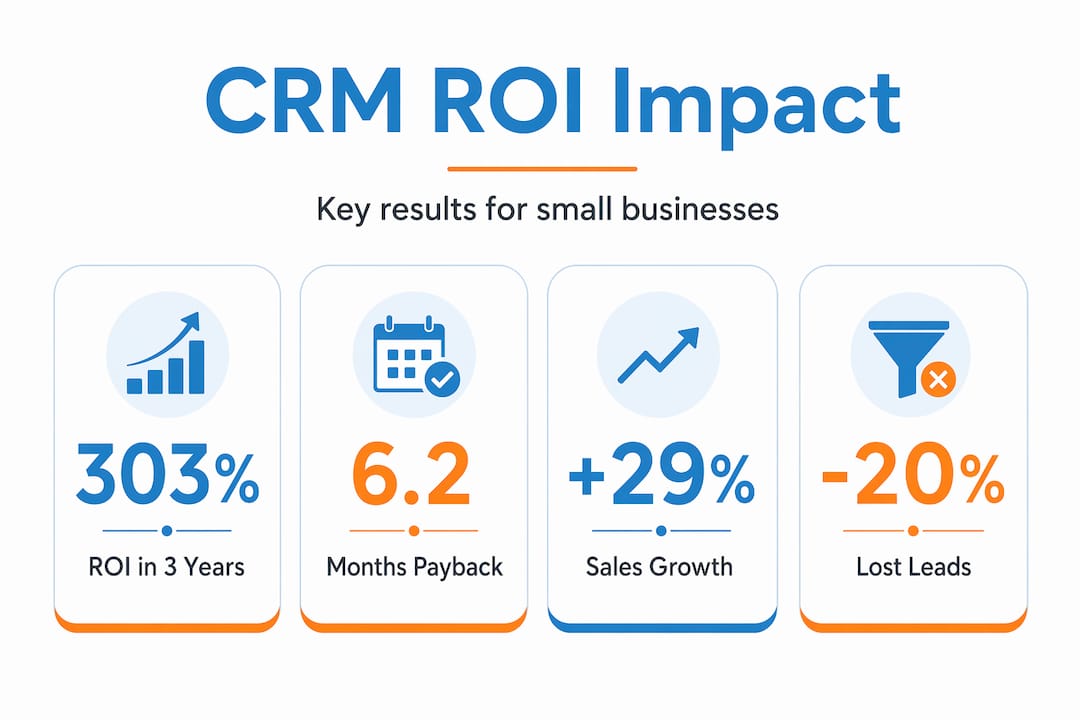
How does that ROI actually materialize? Let’s break it down.
| CRM Benefit | What It Replaces | Measurable Impact |
|---|---|---|
| Automated follow-up reminders | Manual calendar entries and gut feel | Up to 21x higher conversion on timely leads |
| Centralized contact data | Scattered spreadsheets and email threads | 29% average sales increase reported by CRM users |
| Pipeline visibility | Guesswork and monthly review meetings | Reduced forecasting errors by up to 27% |
| Reduced acquisition costs | Repeat outreach to the same cold contacts | 40% reduction in customer acquisition costs |
Automation is the engine underneath all of this. When your CRM automatically schedules a follow-up after a quote is sent, you stop relying on memory. When it logs every interaction, your entire team can see the history without asking anyone. Automated CRM workflows make follow-ups timely and personalized, which hits conversion rates in a way that generic bulk emails simply cannot.
Centralized data is the other half of the equation. When everyone on your team pulls from the same customer record, you eliminate the “I thought you were handling that” conversations. Sales, support, and management are all looking at the same picture. That alone saves hours every week.

Pro Tip: Don’t wait until your pipeline is overflowing to set up CRM automation. Build the follow-up sequences before you need them, so the system is working for you from day one rather than catching up to your backlog.
CRM advantages for startups are particularly sharp because early-stage businesses often have lean teams where one person dropping the ball on a follow-up can mean the difference between making payroll and not. A well-configured CRM is like having an extra team member who never forgets anything and never takes a sick day.
You can explore how lead nurturing with Act! CRM translates these benefits into practical workflows for growing businesses.
CRM adoption pitfalls and how to dodge them
Here’s the uncomfortable truth: 43% of CRM implementations fail due to poor user adoption. And technical issues account for less than 10% of those failures. The problem is almost always people, process, or data.
The good news is that all three are fixable. Here’s how to avoid the most common traps:
-
Choose simplicity over features. The biggest misconception in CRM selection is equating complexity with value. A system with 200 features that your team uses at 10% capacity is worse than a simple system used at 80% capacity. Match the tool to your team’s actual workflow, not to an imaginary future workflow.
-
Integrate with what you already use. Integrating CRM with existing email and accounting tools reduces manual entry, improves data quality, and significantly boosts adoption. If your team has to leave their inbox to log a call, they won’t do it consistently. Remove the friction.
-
Prioritize data hygiene from day one. Poor CRM data costs U.S. businesses $3.1 trillion annually, and 76% of CRM users say less than half their data is accurate. Set up validation rules, deduplicate records before migration, and schedule regular data audits.
-
Roll it out in phases. A phased CRM rollout increases success rates 2.8 times compared to a big-bang launch. Start with contact management and basic follow-up automation. Add reporting and advanced features once the team is comfortable.
-
Get executive buy-in early. Executive sponsorship is present in 82% of successful CRM projects. If leadership treats the CRM as optional, the team will too.
Pro Tip: Identify one or two “CRM champions” on your team before launch. These are the people who get excited about the tool and help their colleagues through the learning curve. Their enthusiasm is worth more than any training manual.
Comparing CRM options for small companies
Not all CRM software for small companies is built the same way. Choosing the wrong one is expensive, not just in money but in the time it takes to migrate away from it later.
Here’s what to prioritize when evaluating your options:
- Contact management depth: Can it store interaction history, notes, documents, and custom fields without requiring a developer to configure it?
- Automation capabilities: Does it handle follow-up sequences, task reminders, and email triggers out of the box, or do you need expensive add-ons?
- Reporting and pipeline visibility: Can a non-technical user build a sales forecast without calling support?
- Integration with your existing stack: Email, calendar, accounting software. If the integrations require custom API work, budget for it or choose something that connects natively.
- Pricing model: Per-user monthly pricing can sneak up on you as you grow. Understand the total cost at your expected team size in two years, not just today.
- Support and training availability: This is where many small businesses get burned. A cheap CRM with no onboarding support often ends up costing more in lost productivity than a pricier option with dedicated training.
The importance of CRM systems is not just in what they do but in whether your team will actually use them. A CRM that fits your workflow like a well-worn glove beats a flashy platform that feels like wrestling a greased pig every morning.
You can review Act! CRM product options to see how feature sets map to typical small business needs.
How to implement CRM successfully
Getting the most out of your CRM investment comes down to preparation and discipline. Here’s a practical sequence that works for most small businesses:
-
Map your current process first. Before you touch any software, write down how a lead currently moves from first contact to closed sale. Identify where things fall through the cracks. Your CRM should fix those gaps, not just digitize your existing mess.
-
Define your must-have features. Based on your process map, list the three to five things your CRM absolutely must do. Use this list to evaluate options, not vendor marketing materials.
-
Set clear milestones for rollout. Week one: import contacts and configure basic fields. Week two: set up your first automation sequence. Week four: run your first pipeline report. Concrete milestones keep momentum going.
-
Train your team on the “why,” not just the “how.” People adopt tools they understand the purpose of. Show your team how CRM helps small business by connecting it directly to outcomes they care about, like fewer missed follow-ups and faster deal closes.
-
Schedule monthly data audits. Data decay requires regular validation and enrichment. Set a recurring calendar event to remove duplicates, update stale records, and check that automations are firing correctly.
-
Use the analytics. Your CRM is generating insights about your pipeline, your conversion rates, and your team’s activity. Review them monthly. The patterns you find will tell you where to focus your energy next quarter.
Pro Tip: Run a 30-day pilot with one sales rep or one product line before rolling out to the full team. Real-world friction shows up fast, and it’s much easier to adjust the configuration with one user than with ten.
My honest take on why CRM fails small businesses
I’ve worked with dozens of small business owners on CRM implementations, and the pattern is almost always the same. The technology works fine. The people part is where things get complicated.
What I’ve seen consistently is that businesses rush to configure every possible feature before anyone has even logged in twice. The system becomes a monument to potential rather than a tool anyone actually uses. Simpler systems with strong data hygiene yield better adoption and ROI than complex platforms that intimidate the team into reverting to spreadsheets.
In my experience, the businesses that get the most out of CRM are not the ones with the most sophisticated setup. They’re the ones where leadership uses it visibly, where the team was involved in the selection process, and where the first version was deliberately basic.
The other thing I’ve learned: automation should support relationships, not replace them. Your CRM can remind you to follow up, but the follow-up itself still needs to feel human. The goal is to free up your time so you can have better conversations, not to turn your customer interactions into a drip campaign that sounds like it was written by a robot.
Why CRM is essential for entrepreneurs is not really about the software. It’s about building the discipline to treat customer relationships as a system rather than a series of one-off interactions. The CRM just makes that system visible and manageable.
— Patrick
Let Smarterbusiness set you up for CRM success
If you’ve been nodding along thinking “yes, this is exactly what my business needs,” then you’re already halfway there. The other half is getting the right setup from day one.

Smarterbusiness is an Act! Certified Consultant specializing in CRM solutions for small and medium-sized businesses in Ireland. That means you get a customized CRM implementation built around your actual processes, not a generic out-of-the-box configuration that you’ll spend months trying to make fit. The team also provides hands-on Act! CRM training so your staff actually uses the system confidently from day one. And if you want expert guidance on strategy before you commit, CRM consultancy services from Smarterbusiness help you avoid the costly mistakes that derail most implementations. Your customer relationships are too important to leave to a spreadsheet.
FAQ
Why do small businesses need CRM?
Small businesses need CRM to centralize customer data, automate follow-ups, and prevent leads from falling through the cracks. Without a system, manual tracking leads to missed opportunities and revenue loss.
What ROI can a small business expect from CRM?
Small businesses typically see 303% ROI over three years, with a payback period of around six months. CRM users also report a 29% average increase in sales.
Why do CRM implementations fail for small businesses?
Poor user adoption accounts for 43% of CRM failures. Choosing overly complex systems, skipping training, and neglecting data quality are the most common reasons implementations go sideways.
How does CRM help with sales follow-ups?
CRM automation sends reminders and schedules follow-up tasks so nothing gets forgotten. Since 80% of sales require five or more follow-ups, having a system that tracks this automatically is a significant advantage.
What features should a small business prioritize in a CRM?
Focus on contact management, automated follow-up sequences, pipeline visibility, and integrations with your existing email and accounting tools. Ease of use matters more than feature count for small teams.