You have 0 items in your cart

Are your valuable leads slipping through the cracks? For many growing Irish businesses, the gap between generating a lead and converting them into a customer is a frustrating source of lost revenue. You invest time and money to attract interest, only for potential customers to go cold due to inconsistent or delayed follow-ups. This is where a structured approach to lead nurturing, powered by Act! CRM, transforms your sales process from a leaky bucket into a streamlined pipeline.
Lead nurturing is the strategic process of building relationships with potential customers at every stage of their journey. It’s about delivering the right information at the right time, building trust, and guiding them towards a purchase decision. By automating this process, you ensure every lead receives the attention they deserve, without overwhelming your sales team.
Table of Contents
What is Lead Nurturing in Act! CRM and Why Does it Matter?
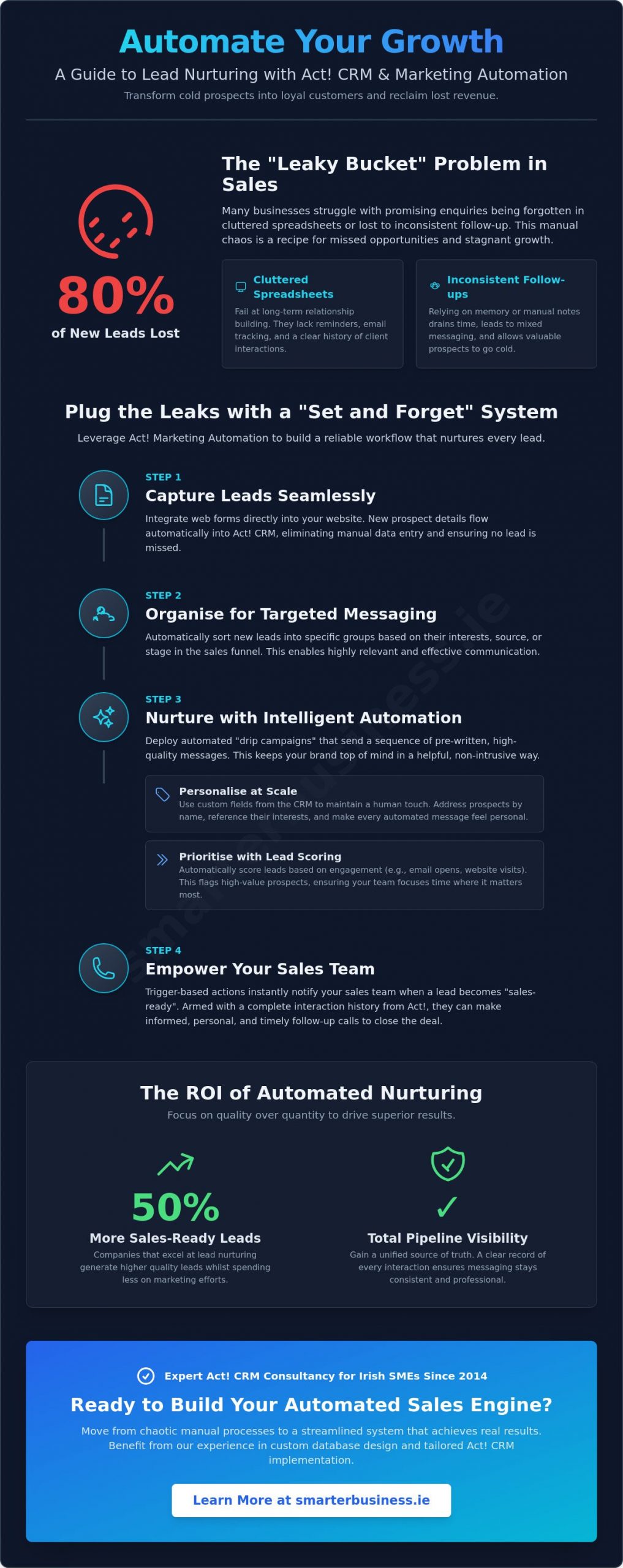
At its core, lead nurturing is the process of developing and reinforcing relationships with buyers at every stage of the sales funnel. It’s a crucial strategy because research shows that up to 80% of new leads never translate into sales without consistent follow-up. This "leaky bucket" problem means most of your marketing efforts are wasted.
While manual follow-ups are time-consuming and prone to error, Act! CRM for lead nurturing allows you to build automated workflows that engage prospects systematically. This frees up your team to focus on what they do best: closing deals. By introducing concepts like "Lead Scoring," Act! CRM even helps you prioritise your efforts by identifying which prospects are most engaged and closest to making a decision. (Lead management)
The ROI of Automated Nurturing
Stop thinking of nurturing as a cost and start seeing it as an investment. Companies that excel at lead nurturing generate 50% more sales-ready leads at a lower cost. By automating your communications, you reduce marketing expenditure while significantly increasing conversion rates. Furthermore, Act! CRM provides a unified "Source of Truth," giving your entire team a complete history of every interaction, from the first click to the final sale.
Act! CRM vs. Spreadsheets for Follow-ups
Many businesses start by tracking leads in a spreadsheet, but this approach quickly becomes unmanageable. Excel and Google Sheets simply cannot support long-term relationship building; they lack the tools for scheduling tasks, recording detailed histories, and automating communication. The Act! CRM Task List and contact History view provide complete visibility into your pipeline, ensuring no opportunity is ever forgotten. In short, lead nurturing is the strategic bridge between a prospect’s initial contact and the final sale.
Leveraging Act! Marketing Automation (AMA) for Lead Nurturing
Act! Marketing Automation (AMA) is a powerful toolset that sits directly inside your Act! CRM database, creating a seamless flow of information between your marketing and sales activities. It eliminates the need for separate, disconnected systems and empowers you to nurture leads with precision and relevance.
The core of AMA is its "Drip Marketing" capability, which lets you send a pre-written sequence of messages to prospects over time. This isn’t just about sending emails; it’s about sending the right message at the right time. You can also create "Trigger-based" actions. For example, when a lead clicks a link in an email to view your pricing page, a salesperson can be notified instantly to make a well-timed follow-up call. All templates are mobile-responsive, ensuring your communications look professional on any device.
Building Effective Drip Campaigns
An effective drip campaign is more than a series of emails; it’s a conversation mapped to your customer’s journey. Start by outlining the typical questions and concerns a lead has at each stage. Use educational content like whitepapers, case studies, and guides to build trust and position your business as an expert. Critically, set appropriate delays and intervals between communications to create a natural, helpful rhythm rather than an aggressive sales pitch.
Advanced Triggers and Branching Logic
AMA’s power lies in its "If/Then" branching logic. This allows you to create dynamic campaigns that adapt to a lead’s behaviour. For instance: if a lead opens an email about Service A, send them a case study on that service; if they don’t open it, send a follow-up email with a different subject line. You can even use AMA to automatically update contact fields in Act! CRM based on their actions, enriching your data over time. By integrating your website’s contact forms directly with Act!, you can kickstart this entire nurturing process the moment a new lead shows interest.
The "Human" Side of CRM: Personalising at Scale
A common objection to automation is that it feels "robotic" and impersonal. However, the goal of using Act! CRM for lead nurturing is not to remove the human touch but to scale it. Deep personalisation is the key to making automated communications feel like a one-to-one conversation.
By using custom fields in Act! CRM, you can capture specific data points about your leads—their industry, specific pain points, or past interactions—and insert them directly into your emails. This allows you to send genuinely helpful, relevant content rather than generic, "salesy" messages. For businesses in Ireland and the UK, this approach must be built on a foundation of permission-based marketing and full GDPR compliance, which Act! CRM helps you manage effectively.
Using Custom Fields for Granular Targeting
Your ability to personalise depends on the quality of your data. Identify key information to collect, such as a contact’s role, business size, or the specific service they enquired about. Using "Mail Merge" tags, you can then pull this data from Act! CRM directly into your emails. A message that reads "Hi Sarah, I saw you were interested in how we help legal firms…" is far more effective than a generic greeting. This is why a custom database design is so valuable; it ensures your CRM is built to reflect your unique sales process.
Permission and Compliance in Nurturing
Building trust starts with respecting your audience’s data and privacy. Act! CRM provides the tools to manage opt-ins and opt-outs, ensuring you only communicate with those who have given you permission. Regularly "cleaning" your data to remove inactive or incorrect contacts is also essential for maintaining a high sender reputation and ensuring your emails reach the inbox. This professional and transparent approach to data management reinforces your brand’s credibility.
5 Steps to Build Your Lead Nurturing Workflow in Act!
Ready to get started? Building your first lead nurturing workflow in Act! CRM is a methodical process. By following these five steps, you can create an automated system that consistently moves leads through your sales pipeline.
-
Capture and Centralise: Integrate your website’s lead capture forms directly with Act! CRM. This eliminates manual data entry, reduces errors, and ensures every new lead immediately enters your nurturing process.
-
Segment Your Database: Don’t send the same message to everyone. Use "Groups" in Act! CRM to segment your database based on criteria like lead source, industry, location, or specific interests.
-
Map the Customer Journey: Define the key stages in your sales process. For each stage, determine what information a lead needs to move to the next step. This map will become the blueprint for your email content.
-
Launch Your AMA Campaign: Build your drip campaign in Act! Marketing Automation. Alongside automated emails, create automated follow-up tasks and activities for your sales team to ensure a perfect blend of digital and human touchpoints.
-
Monitor and Refine: Your first campaign is just the beginning. Use the reporting tools in Act! CRM to monitor open rates, click-through rates, and ultimately, conversion data. Analyse the results to refine your messaging and improve performance over time.
Effective Segmentation Strategies
The foundation of any successful nurturing campaign is effective segmentation. Act! CRM allows you to create "Dynamic Groups," which automatically update as a lead’s data changes. For example, a lead who clicks on a specific product link can be automatically added to a group for a targeted follow-up campaign. Segmenting by "Lead Heat" or engagement score also ensures your sales team focuses their valuable time on the hottest, most qualified prospects.
Measuring Nurturing Success
How do you know if your efforts are working? Focus on a few key metrics: email open rates, click-through rates (CTR), and sales velocity (how quickly leads move through your pipeline). Use the built-in Act! Dashboards to visualise your funnel and easily identify "bottlenecks"—stages where leads tend to drop off—so you can address them directly.
Maximising ROI with Expert Act! Implementation
Implementing a powerful tool like Act! CRM is only the first step. A "standard" setup often leads to poor adoption and disappointing results because it isn’t tailored to your specific business processes. To truly maximise your return on investment, you need a system designed around your goals.
This is where expert implementation and training become critical. A custom database design ensures the CRM mirrors your sales cycle, making it intuitive for your team to use. Professional training empowers your staff to leverage the full capabilities of the software, turning it from a simple database into a growth engine. Since 2014, Smarter Business has been delivering CRM customisation, training and support services to Irish SMEs, helping them organise and automate their systems for success.
Why Custom Database Design is Critical
A CRM should make your team’s life easier, not harder. With tailored fields and layouts, data entry becomes faster and more accurate. A well-designed database architecture also ensures your CRM can grow with your business, adapting to new products, services, and sales strategies. Working with a specialist partner who understands both Act! CRM and the Irish business landscape ensures your system is built for long-term success.
Ongoing Support and Training
Your CRM is a living system that requires ongoing attention. A technical support contract is an investment in operational efficiency, giving you peace of mind that an expert is on hand to resolve issues quickly. At Smarter Business, we focus on helping Irish companies streamline their sales and marketing operations, providing the training and support needed to turn their CRM into their most valuable business asset.
**Ready to automate your follow-ups and turn more leads into loyal customers? Book an Act! CRM consultation with Smarter Business today. **
Frequently Asked Questions
How does Act! CRM help with lead nurturing?
Act! CRM helps by centralising all your lead information and automating communication. Using its Marketing Automation features, you can create drip email campaigns, score leads based on engagement, and set up tasks for your sales team, ensuring no lead is ever forgotten.
Is Act! Marketing Automation (AMA) included in the SaaS subscription?
Act! Marketing Automation is available in tiered packages depending on your Act! CRM subscription level. The features and contact limits vary, so it’s best to discuss your specific needs with an Act! CRM specialist to find the right fit for your business.
Can I personalise automated emails with my leads name and company?
Absolutely. Act! CRM uses mail merge fields to pull any data from a contact’s record—such as their name, company, industry, or last product purchased—directly into your emails. This allows for deep personalisation at scale.
How do I segment my leads in Act! for different nurturing campaigns?
Act! CRM uses a powerful feature called "Groups." You can create static or dynamic groups based on any criteria in your database, such as lead source, location, date of enquiry, or a custom field you’ve created. This allows you to send highly targeted messages to different segments.
Does Act! CRM help with GDPR compliance for my marketing?
Yes, Act! CRM includes features to help you manage compliance. You can track consent, manage opt-in/opt-out preferences, and maintain a clear audit trail of your marketing permissions, which is essential for businesses operating under GDPR.
What is the difference between lead generation and lead nurturing in Act!?
Lead generation is the process of attracting and capturing new interest, for example, through a web form that feeds directly into Act! CRM. Lead nurturing is the process of developing a relationship with those captured leads over time using automated follow-ups and targeted content to guide them towards a sale.
How do I know if my lead nurturing campaigns are actually working?
Act! Marketing Automation provides detailed reports on key metrics like email open rates, click-through rates, and unsubscribes. Within Act! CRM, you can use dashboards and sales reports to track how leads are progressing through your pipeline and measure the ultimate conversion rate from nurtured leads into customers.
Do I need a specialist to set up my Act! lead nurturing workflows?
While the tools are user-friendly, a specialist can help you maximise your ROI. An expert can help you with strategic planning, custom database design to capture the right data, and building complex, behaviour-based workflows that align perfectly with your business goals.