You have 0 items in your cart

A CRM data model is the database blueprint that defines your objects (Contacts, Companies, Deals) and how they connect. The single most important action is this: design and document that schema on paper or in a schema sheet before you configure any CRM software. Skip this step and you end up bolting fields onto whatever the vendor’s demo showed you, which is how most CRMs turn into a junk drawer within eighteen months.
Every mature CRM schema, whatever the brand on the login screen, centres on the same handful of canonical entities. Get these right first and everything else, reporting, automation, permissions, falls into place far more easily.
- Lead: an unqualified prospect, before you’ve decided they’re worth pursuing
- Contact: a real person you’re in dialogue with
- Account/Company: the organisation a Contact belongs to
- Deal/Opportunity: a specific, trackable sales pursuit with a value and stage
- Activity: the calls, emails and meetings that stitch the story together
- User: the human on your team who owns each record
Whether you normalise strictly or deliberately denormalise for speed depends entirely on what you’re optimising for, and we’ll get to that trade-off shortly.
Key Takeaways
A CRM data model works only when the schema is designed and documented before configuration starts, with clear entity ownership and disciplined field governance throughout.
| Point | Details |
|---|---|
| Design before you configure | Map objects, fields, and relationships on a schema sheet before opening the CRM software. |
| Stick to six core entities | Lead, Contact, Account, Deal, Activity, and User cover nearly every business need. |
| Use junction tables for many-to-many | Model shared relationships like Deal-to-Contact with a role field, not a single lookup. |
| Normalise data, denormalise for reporting | Keep base tables in third normal form; build separate summary tables for dashboard speed. |
| Assign ownership to prevent sprawl | One person governs picklist values and field additions to stop schema drift. |
| Get expert help when it matters | Smarterbusiness offers design-first Act! CRM consultancy for SMEs building their first proper schema. |
Table of Contents
- Core CRM entities and what each represents
- Field types, picklists, and governance that actually holds
- Relationships, cardinality, and how to model them properly
- Map and document the schema before you touch the software
- Visualise and share the model with a diagram or export
- Common pitfalls, performance trade-offs, and governance that sticks
- The Smarter Business approach to CRM data modelling
- Why most CRM advice gets the order backwards
- Get your CRM schema built properly from the start
- Sources
Core CRM entities and what each represents
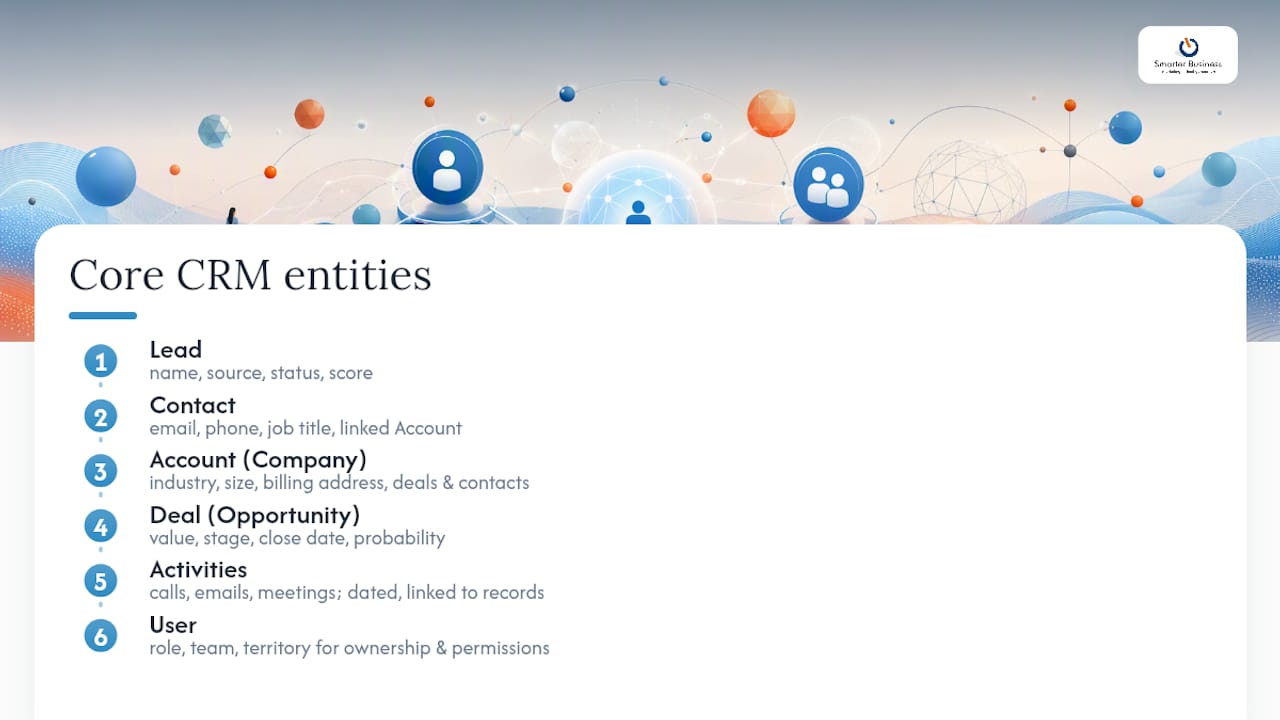
Think of these six entities as the load-bearing walls of your CRM. Knock one down without a plan and the whole structure groans. Get the core entities right, and every report, automation and dashboard you build later stands on solid ground rather than wishful thinking.
A Lead is unqualified noise until proven otherwise. It typically needs a name, source (where did they come from?), status, and a score if you’re doing any kind of prioritisation. A Contact is the confirmed human, complete with email, phone, job title, and a link back to their Account. The Account or Company record holds the organisation itself, industry, size, billing address, and a rollup of every Deal and Contact tied to it.
The Deal or Opportunity is where the money lives: value, stage, close date, probability, and a link to both the Contact and the Account involved. Activities log the actual work, calls made, emails sent, meetings held, each stamped with a date and linked back to whichever Contact or Deal it concerns. And the User entity, often the one people forget to design properly, needs role, team, and territory fields if you want ownership and permissions to behave sensibly later.
Naming varies wildly between platforms. One system calls it an Account, another calls it a Company; one calls it a Deal, another an Opportunity. The underlying concept is identical, so don’t let vendor terminology fool you into thinking you need a different schema for each label.
The judgement call comes when a workflow genuinely doesn’t fit any of the six. A property management firm juggling maintenance requests, or a subscription business tracking renewal dates, needs a vertical-specific entity rather than fifteen extra fields crammed onto the Deal object. Custom tables exist precisely for this, letting you extend the model without distorting the core objects everyone else relies on. The test is simple: if a field only applies to a subset of records and doesn’t map to a universal concept, it deserves its own table, not a permanent home on Contact.
Field types, picklists, and governance that actually holds
Every field type carries reporting consequences you won’t feel until month six, when someone tries to build a dashboard and discovers half the data is unusable. Choose deliberately.
- Text fields for anything genuinely free-form, names, notes, addresses. Resist the urge to use them for anything you’ll ever want to filter by.
- Picklists (dropdowns) for any field with a finite, known set of values, deal stage, lead source, industry. This is where reporting either works or falls apart.
- Lookup/relationship fields to connect one object to another, a Contact to its Account, a Deal to its primary Contact.
- Currency fields for anything monetary, always in a single, consistent currency (€ across your entire schema, not a mix of € and other symbols creeping in from copied templates).
- Formula fields for anything calculated from other fields, days since last contact, weighted pipeline value, so you’re not manually maintaining numbers that should update themselves.
Picklists are where most schemas quietly rot. Someone adds “Interested (Maybe)” as a lead status next to the existing “Interested”, and within a year you’ve got nine variations of the same three meanings. Assign one owner, usually a sales operations lead or the CRM administrator, who alone can add or retire picklist values. New values go through that person, not through whoever’s frustrated on a Tuesday afternoon.
Pro Tip: Before adding any field, ask who will run a report on it within the next quarter. If you can’t name the report, don’t build the field.
For a first go-live, cap custom fields per core object at around 15 to 20. Beyond that, ontology anti-pattern research shows every additional non-essential field raises cognitive load and quietly degrades the quality of everything else your team enters.
Relationships, cardinality, and how to model them properly
Cardinality, the shape of the relationship between two objects, is where most homemade schemas quietly break. Get it wrong and you either lose data or duplicate it endlessly.
- One-to-many: one Account has many Contacts. Model this with a straightforward foreign key on the Contact record pointing back to its Account.
- Many-to-many: one Deal can involve several Contacts (the buyer, the technical reviewer, the finance sign-off), and one Contact can sit on multiple Deals. A single foreign key can’t hold this, so you need a junction table.
- One-to-one: rarer, but occasionally a User maps to exactly one Territory record with no crossover.
The junction table is the piece beginners skip and regret. For deals and contacts, an opportunity_contact table with its own role and contact_role fields lets you record that Sarah is the economic buyer while Tom is the technical reviewer, on the same Deal, without either fact overwriting the other. That relationship detail, the role, is a first-class piece of data in its own right, not a footnote.
Activities raise a separate design question: polymorphic or explicit? A polymorphic Activity table (one table that can link to a Contact, a Deal, or an Account interchangeably) is flexible and saves you building near-identical tables three times over. The cost shows up in reporting, where polymorphic joins are messier to query and easier to get wrong. Explicit join tables per relationship type are more verbose to build but far cleaner to report against later. For most SMEs, the reporting clarity is worth the extra setup time.
Map and document the schema before you touch the software
Every design-first project follows roughly the same sequence, and skipping steps is exactly how rushed configurations end up costing more in rework than they saved in speed.
- List the business questions first. What do you actually need to answer? “Which deals are stalling past 30 days?” and “which accounts haven’t been contacted this quarter?” shape the schema far more usefully than any generic template.
- List the core objects you genuinely need, starting from the six canonical entities and adding vertical tables only where a real workflow demands one.
- Enumerate every field, its type, and whether it’s required, resisting the pull to add “just in case” fields.
- Define cardinality and constraints, marking every relationship as one to many, many to many, or one to one, and noting which junction tables you’ll need.
- Assign an owner to each object and to the picklist values within it, so governance has a name attached, not a shrug.
Build this as a schema sheet: one tab per object, columns for field name, field type, required (yes/no), purpose, owner, and sample values. It’s tedious to build and enormously valuable the first time someone new joins the team and needs to understand the system without three meetings.
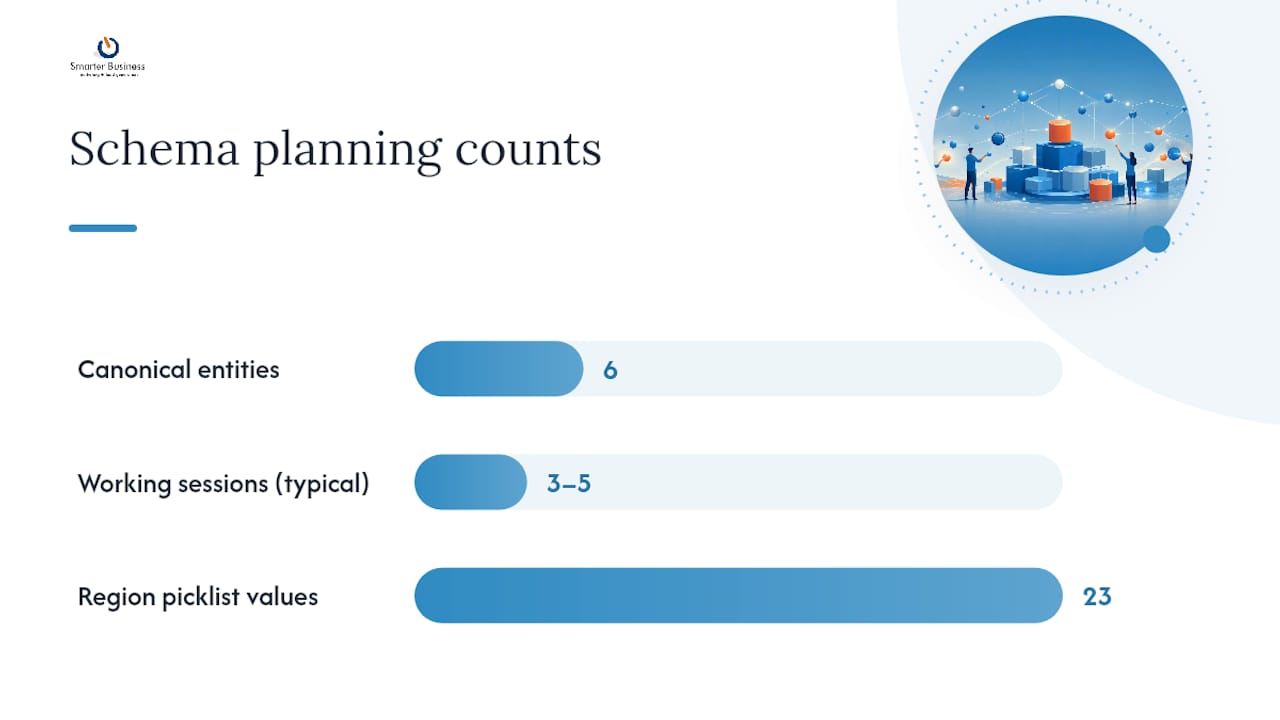
Involve a salesperson (they know what actually gets typed into free text fields versus what should be a picklist), a manager (reporting needs), and someone from finance if currency or invoicing data touches the CRM at all. Cross-functional review at this stage measurably reduces rework later. For a typical SME, expect three to five working sessions spread over one to two weeks, not a single afternoon.
Pro Tip: Version your schema sheet like code. Date each revision and note what changed and why, because six months from now nobody will remember why the “Region” picklist has 23 values.
Visualise and share the model with a diagram or export
A written schema sheet tells you what exists; a diagram tells you how it connects, and the two do genuinely different jobs.
Most established CRM platforms now ship a built-in data model canvas that draws your objects and relationships automatically from whatever you’ve already configured. It’s excellent for a quick sanity check, “does this actually match what I designed?”, but it’s tied to that specific platform and disappears the moment you migrate or need to hand the design to someone outside the tool.
- Use the vendor’s canvas for fast internal review and spotting obvious relationship errors.
- Keep an independent ERD (built in a general diagramming tool, exported as PNG or SVG) as the version of record for handovers, audits, and migrations.
- Export an image of the canvas whenever you make a structural change, and file it alongside your schema sheet with the same date stamp.
That independent export matters more than it sounds. When a business changes CRM vendors, or brings in a new administrator, a static diagram survives the transition; a live vendor canvas does not.
Common pitfalls, performance trade-offs, and governance that sticks
Most CRM schemas don’t fail dramatically. They fail slowly, through small compromises nobody flagged at the time.
The three biggest causes are depressingly consistent: configuring the software before mapping the objects, leaving field and picklist ownership unassigned, and letting custom fields multiply because adding one felt easier than saying no. Harvard Business School research points to exactly this combination, poor data planning and unclear ownership, as a leading cause of CRM initiatives failing to deliver.
Normalise your base tables to third normal form: every field should depend only on that record’s primary key, nothing else, which keeps your data honest and prevents the same fact living in three places and disagreeing with itself. Reporting speed is a separate problem, solved separately. Build summary tables, account-level KPI rollups, last-interaction timestamps, pipeline totals, recomputed on a schedule, that give dashboards fast answers without compromising the integrity of the base tables underneath them.
- Assign one owner per object and one owner per picklist family.
- Cap custom fields and review unused ones quarterly.
- Add `created_at`, `updated_at`, and `deleted_at` fields for audit trails` to every entity for a proper audit trail.
- Treat interaction records as immutable logs, corrections become new entries, never edits.
The Smarter Business approach to CRM data modelling
Smarterbusiness has been building CRM schemas for Irish SMEs since 2014, and the design-first sequence above is exactly how founder Patrick Lennon, whose background is in sales, marketing, and operations rather than pure software, approaches every engagement.
As a certified Act! CRM Consultancy, the work centres on adjusting the model to match how a business actually operates, not the other way round.
- Schema sheets and workflow mapping done before any configuration begins
- Custom tables built for genuine vertical needs, not generic bloat
- Picklist governance and field ownership set up from day one
- Training so the team, not just the administrator, understands the model they’re using
Why most CRM advice gets the order backwards
Most guidance on this topic treats the data model as a technical afterthought, something the software vendor or IT person sorts out once the “real” decisions, which package, which price tier, are settled. That’s the wrong order entirely. The schema is the decision that determines whether every other choice works.
What’s consistently underrated is governance, not design. Businesses will happily spend a week mapping objects and fields, then hand picklist ownership to nobody in particular, and watch the same rot creep back in eighteen months later. A schema sheet without a named owner is a document, not a system.
If you’re starting from scratch, prioritise the business questions first, not the field list. Every field should trace back to a report someone will actually run. Everything else is clutter waiting to happen, and clutter is precisely what pushed you off spreadsheets in the first place.
— Patrick Lennon
Get your CRM schema built properly from the start
Smarterbusiness is the practical alternative to configuring first and fixing later: instead of a vendor demo pushing you towards generic defaults, you get a schema mapped to how your business actually runs, before a single field goes live.

That means fewer abandoned custom fields, cleaner reporting from day one, and a model your team can actually explain to a new hire without three meetings and a shrug. As a certified Act! CRM Consultancy working with Irish SMEs since 2014, Smarterbusiness builds the schema sheet, sets up governance, and configures custom tables around your genuine workflows, not the vendor’s assumptions about them.
If you’re planning a first implementation or untangling a CRM that’s grown messier than intended, get in touch about Act! CRM training and schema support to see what a design-first setup would look like for your team.
Sources
- Third normal form tutorial — DataCamp
- CRM data model design: a 6-step guide — Rework Resources
- CRM data model explained: contacts, companies, deals, and beyond — MRIA CRM